
Is your screen stuck on “Playlist Load Error” or “Authorization Failed”?
Stop banging your head against the wall. As an IPTV provider, I see these support tickets every single day. In fact, 99% of the time, the server isn’t down it’s simply a configuration mismatch on your end.
Whether you are using TiviMate, IPTV Smarters, or XCIPTV, the fix is usually the same. Therefore, I have compiled the exact checklist we use internally to get customers back online in under 5 minutes.
Follow this guide step-by-step to fix your M3U and Xtream Code connection failures.
The "Confidence Check" (Try These First)
First and foremost, before you start messing with advanced router settings, check the “uninformed” stuff. Surprisingly, these three issues account for the vast majority of tickets I close.
1. The “Invisible Space” Killer
This is the #1 reason for “Invalid Details” errors. For instance, when you copy your username or URL from an email, your phone/PC often adds a silent blank space at the end.
-
The Fix: Click into the field, go to the very end, and hit backspace. If the cursor moves, you found the culprit.
-
Visual Check:
http://line.provider.com(Fails) vshttp://line.provider.com(Works).
2. Max Connections Exceeded
Most premium subscriptions are strictly limited to 1 active connection.
-
The Scenario: You were testing the line on your phone, didn’t close the app completely, and subsequently tried to open it on your TV.
-
The Result: Consequently, the server blocks the second login.
-
The Fix: Force close the app on all other devices before logging in on your main TV.
3. Subscription Status
Did you forget to renew? Unfortunately, most services do not auto-renew for security reasons. Check your dashboard or email to ensure your line hasn’t expired.
Phase 1: Fixing Xtream Code API Errors
(If you are entering a Server URL, Username, and Password)
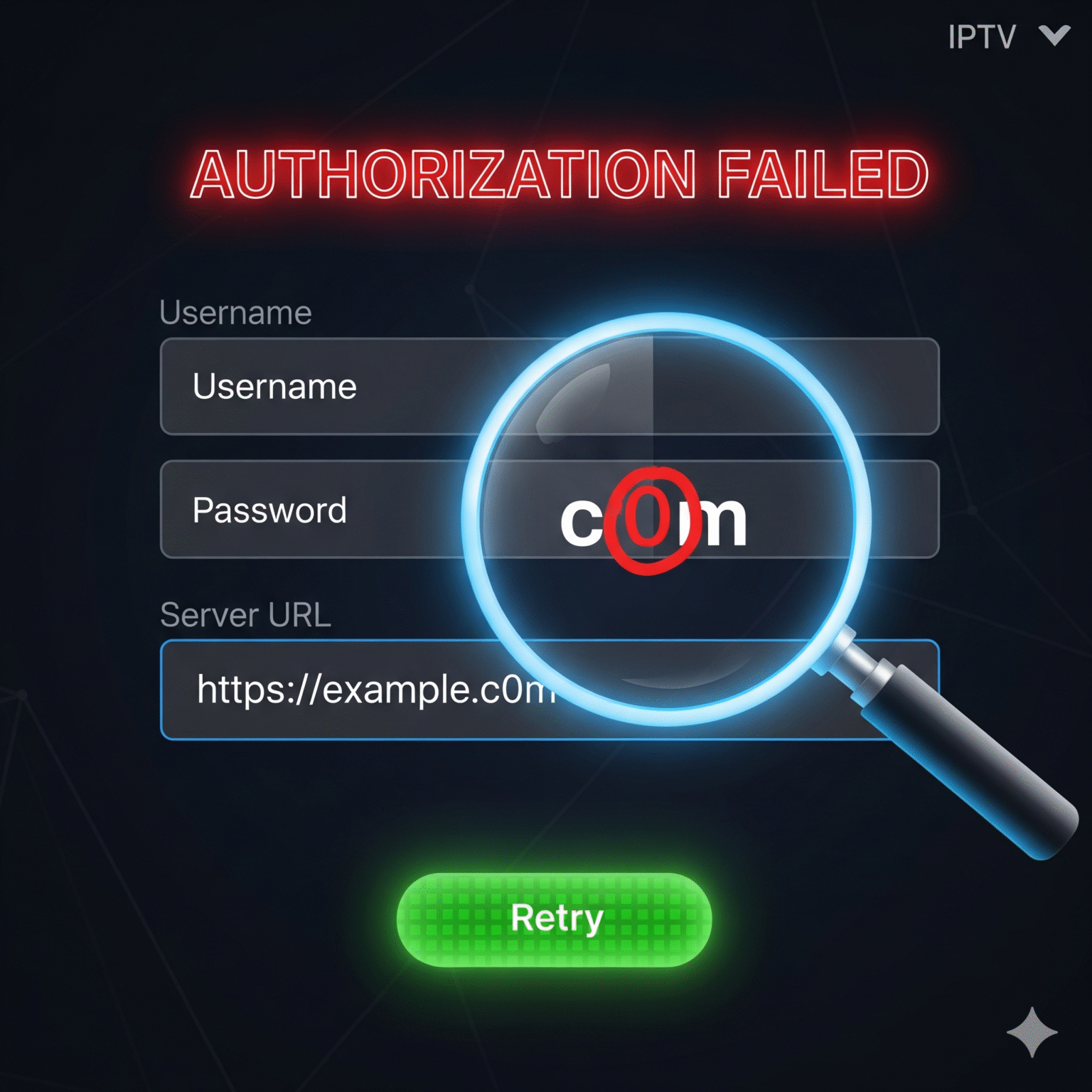
If you are seeing “Authorization Failed” or “Check Playlist URL”, the issue is almost certainly a typo in the server address.
The Exact Server URL Matters
You cannot guess this part. On the contrary, it must be character-perfect.
-
HTTP vs HTTPS: If we sent you
http://, do not typehttps://, otherwise the SSL handshake will fail. -
The “Trailing Slash”: Never put a
/at the end of the URL.-
❌ Wrong:
http://line.provider.com:8080/ -
✅ Correct:
http://line.provider.com:8080
-
-
The Port Number: Furthermore, if your URL ends in
:80,:8080, or:25461, you absolutely need to type those numbers.
The “O” vs “0” Problem
-
Look at your password carefully. Is that a capital Letter O or the Number 0?
-
Similarly, verify if that is a lowercase l (lion) or a capital I (Igloo).
-
Pro Tip: Copy/paste is safer than typing, provided you watch out for the “Invisible Space” mentioned above.
Phase 2: Bypassing ISP Blocks & DNS Issues
(If your credentials are correct but it still won’t load)
However, if you type everything correctly and get a generic “Connection Failed” or “Playlist Load Error,” your Internet Service Provider (ISP) is likely blocking the IPTV server’s domain. This is particularly common in the UK and USA during live sports events.
The VPN Test
To begin, turn on a VPN on your device.
Next, select a server in a different country.
Hit “Refresh” on your playlist.
Verdict: If it loads instantly with the VPN on, your ISP is actively blocking the service. Therefore, you must keep the VPN on to watch.
The DNS Bypass (No VPN Required)
Alternatively, if you don’t have a VPN, try changing your DNS to bypass basic ISP filters.
Go to your Device Network Settings.
Change DNS from “Auto” to “Custom”.
Enter Google’s DNS:
8.8.8.8(Primary) and8.8.4.4(Secondary).Finally, restart your device and try again.
Phase 3: Fixing M3U Playlist URL Errors
(If you are pasting one long link)
1. Syntax & Options Mismatch
Additionally, does your link end in weird text like &output=ts?
The Fix: Some older players choke on
.tsstreams. Change the end of the URL fromoutput=tstooutput=m3u8. This forces the server to send a standard HLS stream which is compatible with 99% of players.
2. The User-Agent Block
Some providers (us included) sometimes block generic players to prevent server scraping.
The Fix: In your app settings (TiviMate/Smarters), look for “User-Agent”.
Enter:
VLCorIPTVSmartersPro.Why? This tricks the server into thinking you are using a verified media player.
3. Playlist is Too Big (RAM Crash)
For example, if you load a playlist with 80,000 movies on a cheap Firestick Lite, the app will crash before it finishes downloading.
The Fix: Contact your provider and ask them to remove VOD (Movies/Series) from your playlist line. A lighter playlist loads faster and buffers less.
App-Specific Troubleshooting
TiviMate “Parser Exception” or “Error 404”
Clear Cache: Go to Settings > Apps > TiviMate > Clear Cache. (Do NOT clear data, or you lose your favorites).
Update App: Moreover, TiviMate versions older than 4.0 often fail with modern Xtream Codes APIs. Update immediately.
IPTV Smarters “Invalid Details”
DNS Flush: If your provider migrated servers recently, your router might be remembering the old IP address. Unplug your router for 30 seconds to flush the DNS cache.
The VLC Diagnostics Test
If you are arguing with your provider that “the server is down” and they say “it’s up,” use this tie-breaker.
Download VLC Media Player on your phone/PC.
Go to Media > Open Network Stream.
Paste your M3U URL.
The Verdict: If it plays in VLC, your TV app is the problem. Conversely, if it fails in VLC, the server or your ISP is the problem.
Summary Checklist: Diagnose in Seconds
Error Message | Most Likely Cause | The Quick Fix |
|---|---|---|
“Authorization Failed” | Typo or Expiry | Retype password manually. Check specific characters (0 vs O). |
“Playlist Load Error” | ISP Block | Turn on VPN or set DNS to 8.8.8.8. |
“Check Playlist URL” | Formatting | Remove trailing space or slash |
App Crashes on Load | List too large | Ask provider to remove VOD/Movies from your line. |
Buffering | ISP Throttling | Use a VPN to hide traffic. |
Still stuck? Drop a comment below with your specific error message and device, and I’ll help you troubleshoot.
 English (UK)
  English (United States)
  German
  Dutch
Dutch  Swedish
  Danish
  English (Australia)
  English (New Zealand)
  Norwegian