
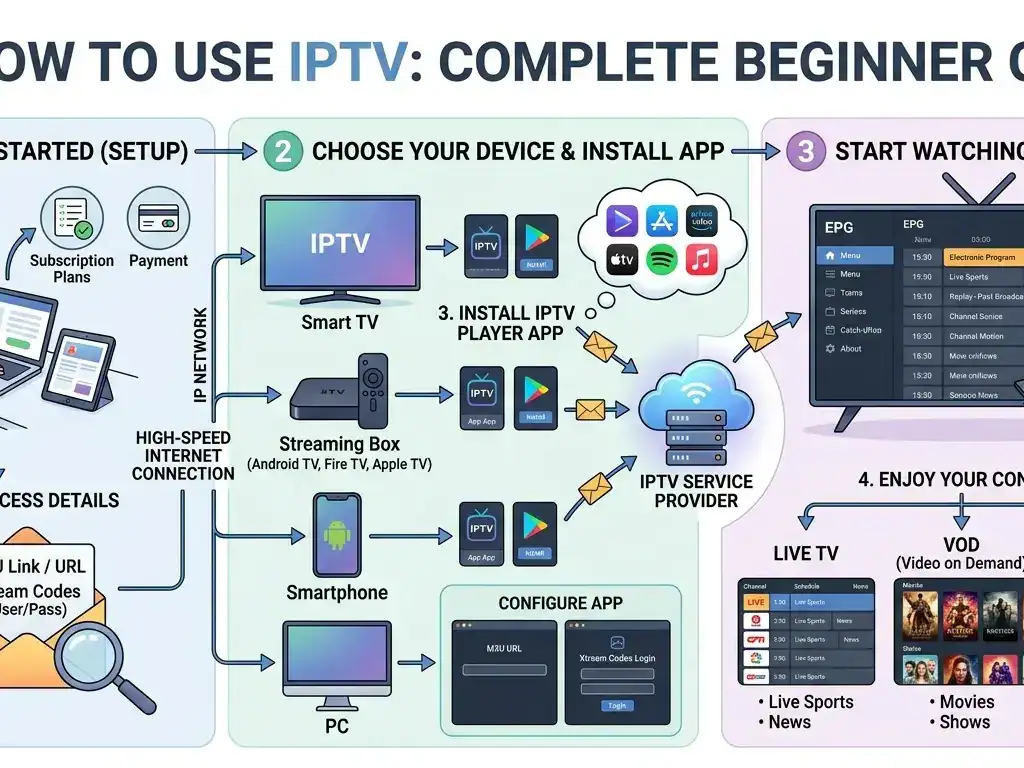
IPTV has become one of the easiest ways to watch live TV, movies, series, sports, and international channels through the internet. Instead of using a satellite dish or traditional cable, IPTV works with your internet connection and a compatible device.
In this guide, you will learn what IPTV is, how it works, what you need to use it, and how to set it up step by step.
Wat is IPTV?
IPTV means Internet Protocol Televisie. It is a technology that allows you to watch TV content using the internet.
With IPTV, you can access:
Live tv-kanalen
Movies and TV shows
Sportzenders
Internationale zenders
Video-on-demand content
Catch-up TV, depending on the service
The main difference between IPTV and traditional TV is that IPTV does not need a satellite dish or cable line. You only need internet and an IPTV app.
Wat heb je nodig om IPTV te gebruiken?
To use IPTV, you need three basic things:
A stable internet connection
An IPTV subscription
A device that supports IPTV apps
For the best experience, a fast and stable internet connection is very important. For HD channels, you should have at least 15 Mbps. For 4K channels, 30 Mbps or more is recommended.
Devices You Can Use for IPTV
IPTV works on many devices, including:
Slimme tv's
Android tv-dozen
Amazon Fire Stick
MAG dozen
Android-telefoons en -tablets
iPhone and iPad
Windows-pc
Mac
Roku, depending on the app support
The best devices for IPTV are usually Smart TVs, Fire Stick, Android TV boxes, and Android phones because they support many IPTV apps.
Best IPTV Apps to Use
To watch IPTV, you need an IPTV player app. The app does not usually include channels by itself. It only helps you play the IPTV service provided by your subscription.
Popular IPTV apps include:
IPTV Smarters Pro
TiviMate
XCIPTV-speler
Slimme IPTV
IBO Speler
Flix IPTV
GSE Slimme IPTV
Each app has a slightly different setup, but most of them work with Xtream Codes login or M3U playlist links.
How to Use IPTV Step by Step
Step 1: Choose an IPTV Subscription
First, you need to choose a reliable IPTV provider. After buying a subscription, the provider usually sends you login details by email or WhatsApp.
These details may include:
Gebruikersnaam
Wachtwoord
Server URL
Link naar M3U-afspeellijst
Portal URL, for MAG devices
Keep these details safe because you will need them to activate your IPTV app.
Step 2: Install an IPTV App
Go to the app store on your device and install an IPTV player.
Bijvoorbeeld:
On Android TV or Fire Stick, you can use IPTV Smarters Pro, TiviMate, or XCIPTV.
On Smart TV, you can use Smart IPTV, IBO Player, or Flix IPTV.
On mobile, you can use IPTV Smarters Pro or GSE Smart IPTV.
After installing the app, open it and choose the login method.
Step 3: Add Your IPTV Login Details
Most IPTV apps give you two common options:
Inloggen met Xtream Codes API
This is the easiest method. You only need to enter your username, password, and server URL.
Login with M3U URL
This method uses a long playlist link provided by your IPTV provider.
After entering your details, click Gebruiker toevoegen, Inloggenof Maak verbinding met, depending on the app.
Step 4: Wait for Channels to Load
Once you log in, the app will start loading channels, movies, and series. This may take a few seconds or a few minutes depending on your internet speed and the size of the playlist.
After loading is complete, you can start watching your favorite content.
Step 5: Organize Your IPTV App
Many IPTV apps allow you to organize your content. You can:
Add channels to favorites
Search for channels
Filter by country
Filter by category
Hide unwanted categories
Change the player settings
This makes it easier to find what you want to watch.
How to Use IPTV on a Smart TV
To use IPTV on a Smart TV, install an IPTV app from the TV app store. Popular apps for Smart TVs include IBO Player, Smart IPTV, Flix IPTV, and IPTV Smarters if available.
After installation, open the app and enter your IPTV details. Some Smart TV apps require activation using the device MAC address. In that case, you may need to upload your M3U playlist on the app’s official website.
How to Use IPTV on Fire Stick
Amazon Fire Stick is one of the most popular devices for IPTV.
To use IPTV on Fire Stick:
Install the Downloader app
Download an IPTV app such as IPTV Smarters or XCIPTV
Open the app
Enter your IPTV login details
Wait for the content to load
Fire Stick is a good choice because it is affordable, fast, and easy to use.
How to Use IPTV on Android Phone
Using IPTV on an Android phone is simple. Go to Google Play Store, install an IPTV player, and enter your subscription details.
After that, you can watch IPTV anywhere as long as you have a good internet connection.
How to Use IPTV on iPhone or iPad
On iPhone or iPad, go to the App Store and install an IPTV player such as IPTV Smarters, GSE Smart IPTV, or another compatible app.
Then enter your IPTV login details and start watching.
Common IPTV Problems and How to Fix Them
IPTV Is Buffering
Buffering usually happens because of slow internet, overloaded Wi-Fi, or server issues.
To fix it:
Restart your router
Use Ethernet cable instead of Wi-Fi
Close other apps using the internet
Lower the stream quality
Try another channel
Contact your IPTV provider
IPTV App Not Working
If the app is not working, try clearing the app cache, restarting the device, or reinstalling the app.
Also, check if your IPTV subscription is still active.
Channels Are Not Loading
This can happen if your login details are wrong or your subscription has expired.
Check your username, password, and server URL carefully. One wrong letter can stop the app from connecting.
Some Channels Are Freezing
If only some channels freeze, the issue may be from the channel source. Try another channel or contact your provider.
Tips for the Best IPTV Experience
Use a stable internet connection
Use Ethernet instead of Wi-Fi when possible
Choose a good IPTV app
Keep your app updated
Use a powerful device
Restart your router regularly
Avoid using too many devices on the same connection
These small steps can improve speed, reduce buffering, and make IPTV more enjoyable.
Laatste gedachten
IPTV is a simple and flexible way to watch TV through the internet. You can use it on Smart TVs, Fire Stick, Android devices, iPhone, tablets, and computers.
To start using IPTV, you only need a stable internet connection, an IPTV subscription, and a compatible IPTV app. Once everything is set up, you can enjoy live channels, movies, series, and sports from one place.
For the best experience, always use a reliable IPTV service, a good device, and a fast internet connection.
 Dutch
Dutch  English (United States)
  German
  Danish
  English (UK)
  Norwegian
  Swedish