
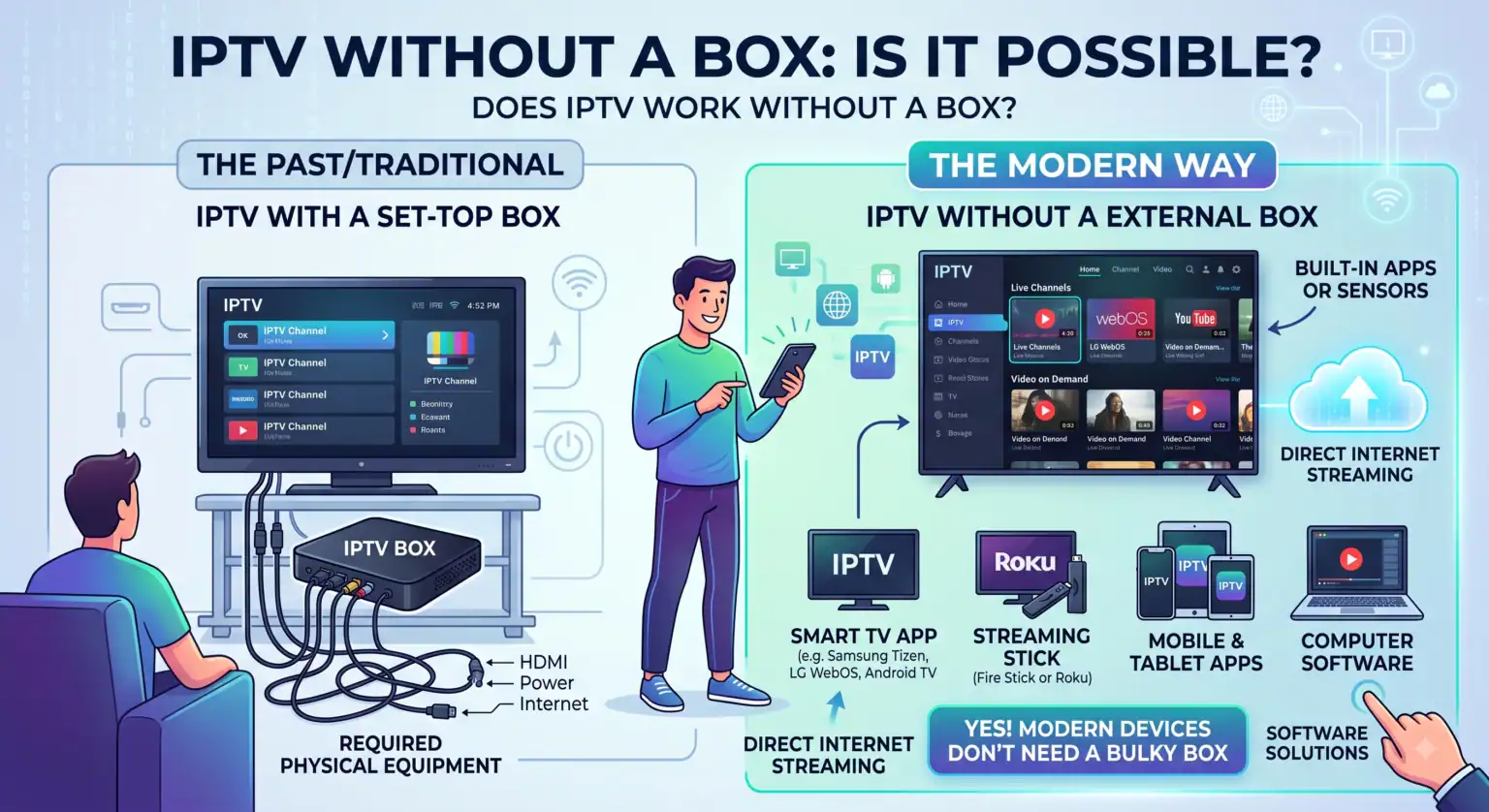
If you are wondering whether you need to buy extra hardware to start streaming, the short answer is ja, IPTV werkt perfectly without a dedicated box.
Years ago, getting an IPTV-abonnement meant you had to purchase a specialized set-top box (like a MAG box or Formuler device) just to decode the signal. Today, the technology has shifted entirely. If you own a Smart TV, a streaming stick like an Amazon Firestick, a smartphone, or a laptop, you already have everything you need to start watching live TV and on-demand content.
Here is exactly how to set up IPTV without a box, what devices work best, and the apps you need to make it happen.
How Box-Free IPTV Actually Works
Instead of relying on a physical piece of hardware to process your channels, modern IPTV-aanbieders send you digital credentials when you sign up. This usually comes in one of two formats:
An M3U Playlist URL: A long web link containing your provider’s entire catalog of live channels and VODs.
Xtream-codes API: A simpler login method requiring a server URL, username, and password.
You take these credentials and plug them into an IPTV player app. The app essentially acts as the “box”. It reads the raw data from your provider and organizes it into a clean, easy-to-navigate TV guide (EPG), complete with channel categories, movie posters, and catch-up features.
The Best Devices for Box-Free Streaming
You don’t need to spend hundreds of dollars on extra hardware. The devices you likely already have in your living room are more than capable of handling high-definition streams.
Smart TVs (Samsung, LG, Sony, TCL): This is the most seamless route. Simply open your TV’s built-in app store (Google Play, Tizenof WebOS) and search for an IPTV player. There are no extra remotes to juggle and no HDMI ports taken up.
Amazon Firestick & Fire TV: If you have an older TV that isn’t very “smart,” a Firestick is the most popular way to bypass buying an expensive IPTV box. They are cheap, powerful, handle 4K streaming effortlessly, and give you access to the best third-party Android apps.
Apple TV & iOS: While Apple’s ecosystem is a bit more restricted, there are several fantastic, premium IPTV players available directly in the App Store that handle live TV flawlessly.
Smartphones en tablets: Whether you are on iOS or Android, you can download a player app and take your subscription on the go.
The Player Apps You Need to Make it Work
Since you aren’t using a provider’s proprietary box, you get to choose your own interface. The app you pick dictates how your TV guide looks, how fast channels load, and what features you have access to.
Here are the top players for a box-free setup:
TiviMate: If you are using an Amazon Firestick or an Android TV, TiviMate is the gold standard. It is designed specifically for live TV, offering an incredibly fast, highly customizable TV guide that feels exactly like a traditional cable box.
IPTV Smarters Pro: The undisputed heavyweight of accessibility. It is free, supports multiple playlists, has a great layout for both live TV and video-on-demand (VOD), and is highly beginner-friendly across almost all devices.
IBO Player & Smart IPTV: Fantastic options for Smart TVs (especially Samsung and LG). These usually require a small one-time activation fee per device but offer a very clean, stable viewing experience without external hardware.
Comparison: Box-Free Setup vs. Dedicated IPTV Box
Is there ever a reason to actually buy a dedicated IPTV box anymore? Here is how the two approaches stack up against each other.
| Functie | Box-Free (Smart TV, Firestick, Apps) | Dedicated IPTV Box (MAG, Formuler) |
| Initial Cost | Free to $40 (If buying a Firestick) | $100 – $160+ for the hardware |
| Installatieproces | Download an app and paste your login details | Plug into TV, configure network, update firmware |
| Interface Customization | Hoog – Switch apps anytime if you don’t like the layout | Laag – You are stuck with the manufacturer’s interface |
| Hardware Clutter | None (Uses existing TV or hidden HDMI stick) | Requires physical space and a power outlet |
| Prestaties | Depends on your TV/Stick (Firestick 4K is excellent) | Usually very fast, built specifically for heavy streaming |
| Beste voor | 95% of users, budget-conscious streamers | Users who want a traditional, old-school cable feel |
De bodemlijn
Unless you specifically want a dedicated remote control with numbered buttons and an interface that perfectly mimics an old-school cable box, you do not need to buy a dedicated IPTV-box. Setting up IPTV without a box using a Smart TV app or an Amazon Firestick is faster, much cheaper, and gives you complete control over how your entertainment looks and feels.
All you need is a solid internet connection (at least 15-25 Mbps for stable HD streaming), a reliable IPTV player app, and your provider’s login details to get started.
 Dutch
Dutch  English (United States)
  German
  Danish
  English (UK)
  Norwegian
  Swedish