
If you are trying to figure out how to install Smart One IPTV on your living room television, you are in the right place. While Android boxes get most of the attention, Samsung and LG natively support some of the best media players available.
Because smart one iptv samsung tizen and smart one iptv lg webos are among the most highly searched terms by new cord-cutters, we have put together this step-by-step guide. We will show you exactly how to find the application, get it running, and even how to bypass regional blocks if the app is hidden in your local store.
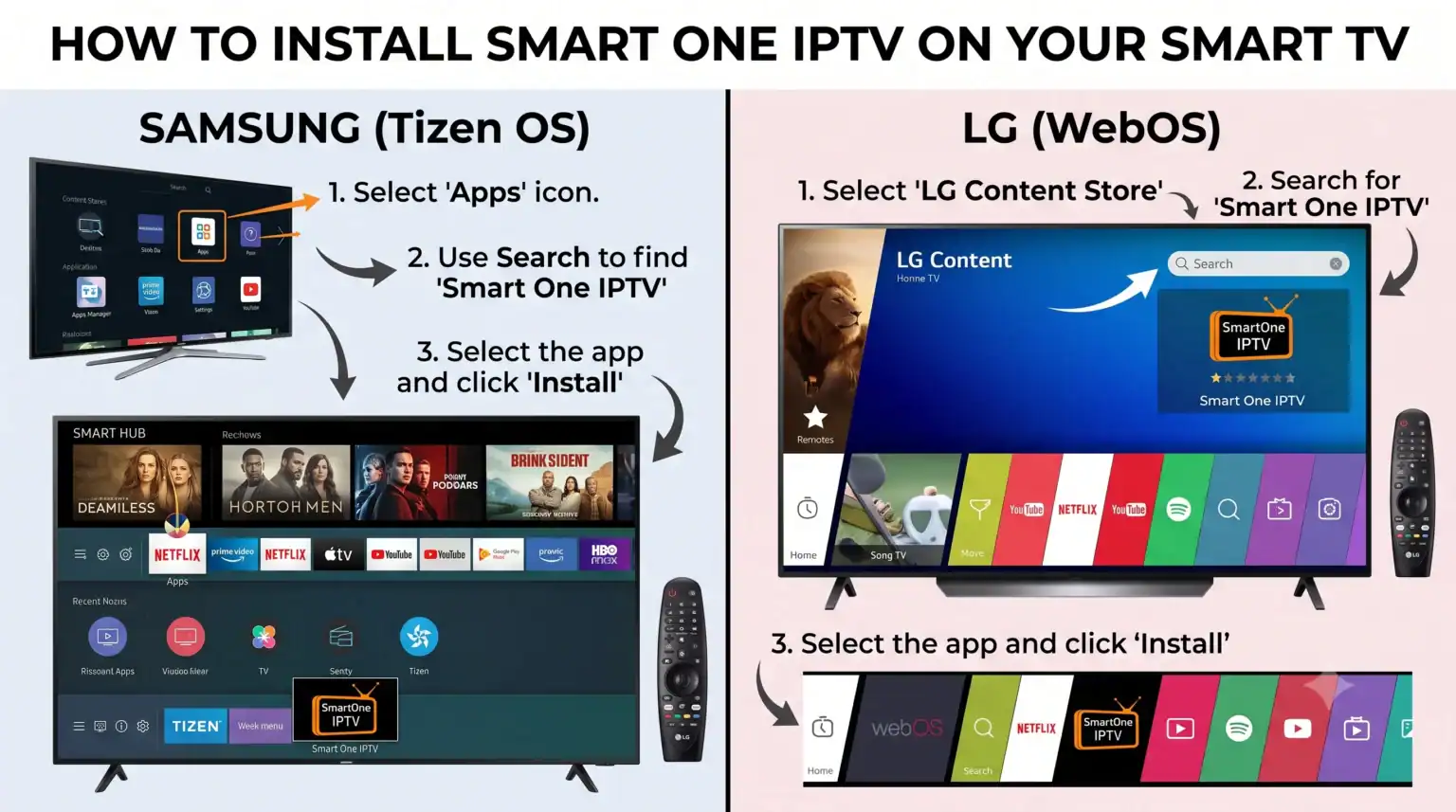
Installing on LG WebOS
LG televisions use a proprietary operating system called webOS, which is incredibly intuitive for media streaming. The developers have ensured broad compatibility, supporting LG webOS TVs ranging from 2014 models (webOS 1.0) all the way up to 2025 models (webOS 25).
Follow these steps to get the app on your LG TV:
Turn on your LG TV and press the Home button on your remote.
Navigate to the LG Content Store.
Use the search icon to look for “SmartOne IPTV”.
Select the app and click “Install”.
Once the installation finishes, you can access the SmartOne IPTV app directly from the Apps Home menu.
Installing on Samsung Tizen
Samsung televisions running the Tizen OS are excellent for handling heavy channel lists. For standard Tizen TVs produced between 2016 and 2021 (series K, M, N, Q, R, and T), the app is officially available directly in the marketplace.
Press the Home or Smart Hub button on your Samsung remote.
Navigate to the Apps section (Samsung Store).
Search for “SmartOne IPTV“.
Select the application and hit “Install”.
Once completed, launch the app from your Apps Home screen.
The USB Sideload Method (For Hidden Regions)
In some regions, IPTV applications are heavily restricted due to local store policies, meaning the app might not appear when you search for it. Additionally, if you have an older 2015 Samsung TV (J series), manual installation is required. If you cannot find the app, use this USB workaround:
Download the official smartone_tizen.zip archive from the developer’s support page.
Extract the contents of the zip file to the root folder of a FAT32-formatted USB flash drive.
Turn on your Samsung TV and plug the USB drive into one of the TV’s USB ports.
The television’s system will automatically detect the plugin and begin the installation process.
Wait for the on-screen prompt confirming a successful installation. You can then remove the USB drive (unless you are using a J series TV, which requires the drive to remain plugged in).
Your Next Steps: Connecting a Provider
Remember, launching the application is only step one. SmartOne IPTV is strictly a media player and does not provide any channels, playlists, or subscriptions out of the box.
Once you open the app on either your Samsung or LG TV, it will display a unique MAC address on the screen. You will need to take this MAC address to the developer’s website to link your M3U list or Xtream Codes API.
If you are setting up your TV and need a high-speed, reliable server to test, check out our recommended premium subscriptions. You can use our exclusive Promo Code at checkout to unlock top-tier sports, movies, and international channels with absolutely zero buffering.
 English (UK)
  English (United States)
  German
  Dutch
Dutch  Danish
  Norwegian
  Swedish