
Hvis du leder efter IBO-spiller afspilningsliste, IBO Player M3U, hvordan man tilføjer en afspilningsliste til IBO-spiller, eller spekulerer på, om IBO Player Pro Denne gratis, omfattende guide gennemgår alt på en overskuelig, præcis og trinvis måde. Uanset om du er nybegynder inden for IPTV-afspillere eller er i gang med at optimere din Smart TV-opsætning, hjælper denne artikel dig med at opnå den bedste ydeevne i 2026.

Hvad er IBO Player?
IBO-spiller er en populær IPTV-afspiller til Smart-tv’er, der giver brugerne mulighed for at streame live-tv, film og serier ved hjælp af M3U-afspilningslister eller Xtream Koder. Selve appen tilbyder ikke kanaler; i stedet afspiller den indhold fra de afspilningslister, du tilføjer.
Hvorfor brugerne vælger det
Overskuelig Smart TV-brugergrænseflade
Hurtig indlæsning af afspilningslister
Stabil afspilning af HD-, Full HD- og 4K-streams
Enkel aktiveringsmodel (Gratis vs. Pro)
Hvad er en IBO-afspilningsliste?
En IBO Player-afspilningslistet er typisk en M3U URL leveret af din IPTV-udbyder. Den indeholder kanallinks, kategorier og undertiden EPG-data (tv-programoversigt). Når den er tilføjet, inddeler IBO Player kanalerne i live-tv, film og serier, så det er nemt at finde rundt.
Understøttede afspilningslisteformater
✅ M3U / M3U8-URL
✅ Xtream-koder (brugernavn, adgangskode, server-URL)
Sådan tilføjer du en afspilningsliste i IBO Player (trin for trin)
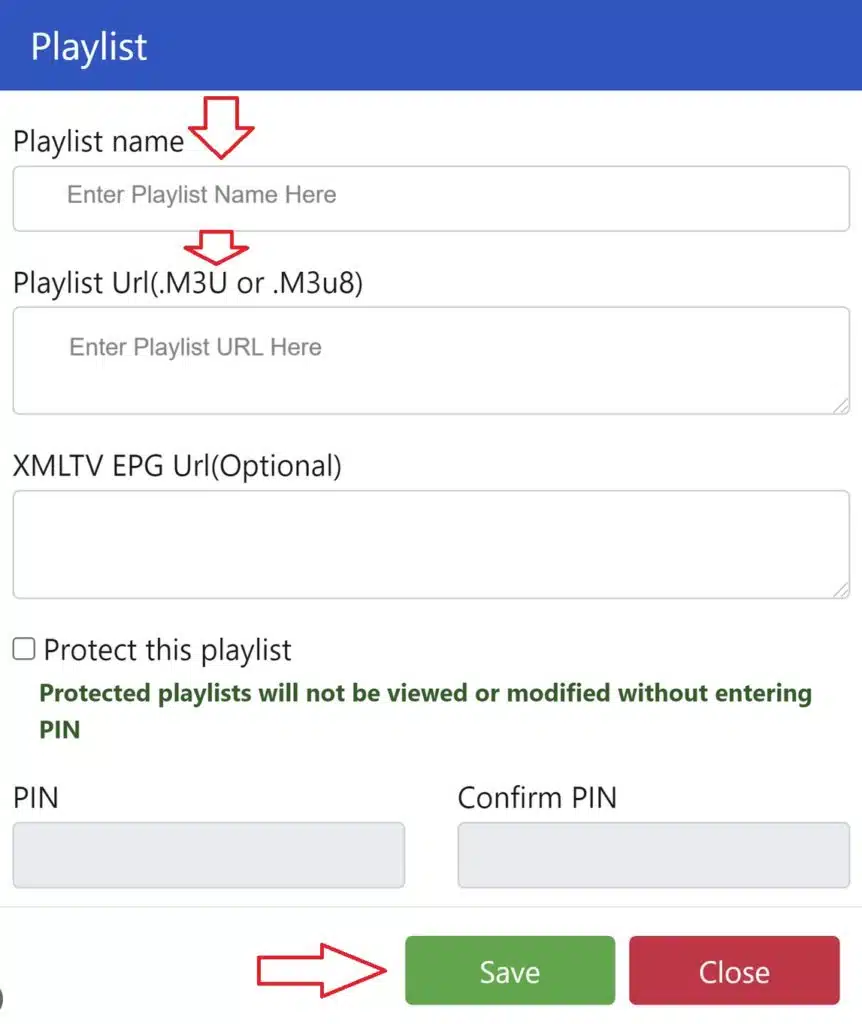
Følg disse trin for at tilføje en IBO-spiller M3U-spilleliste korrekt:
Installer IBO-spiller på dit Smart TV og åbn appen
Notér enheds-ID’et og enhedsnøglen vises på skærmen
Åbn den IBO Player-playlisteportal på din telefon eller computer
Indtast din Enheds-ID og nøgle
Indsæt din M3U-spilleliste URL (eller Xtream-koder)
Gem og genstart appen på dit tv
Dine kanaler indlæses automatisk, når siden opdateres.
Tip: Brug en stabil internetforbindelse (helst kablet Ethernet) for at undgå buffering under den første synkronisering.
Fungerer IBO Player M3U ikke? Almindelige løsninger
Hvis din IBO Player-afspilningslisten indlæses ikke, så kan du prøve disse hurtige løsninger:
Kontroller endnu en gang, at M3U URL (ingen ekstra mellemrum)
Genstart tv’et, og opdater appen
Opdater afspilningslisten fra portalen
Prøv afspilningslisten på en anden enhed
Sørg for, at din IPTV-abonnement er aktiv
De fleste problemer skyldes udløbne eller forkert kopierede M3U-links.
Er IBO Player Pro gratis?
Dette er et af de spørgsmål, der søges mest på.
Kort svar: ❌ Nej, IBO Player Pro er ikke gratis, men der er en begrænset gratis prøveperiode.
Gratis version
Midlertidig prøveperiode
Grundlæggende afspilning
Der kan forekomme vandmærker eller begrænsninger
Pro-versionen
Engangsgebyr for aktivering (ikke et abonnement)
Ubegrænset brug af afspilningslister
Hurtigere indlæsning og mere jævn ydeevne
Ingen afbrydelser
Ved langvarig brug, IBO Player Pro er det bedste valg, når det gælder stabilitet og brugervenlighed.
IBO Player Free vs. Pro – Hvad er forskellen?
| Funktion | Gratis | Pro |
|---|---|---|
| Afspilningslistens varighed | Begrænset | Ubegrænset |
| Præstation | Standard | Optimeret |
| Vandmærker | Det er muligt | Ingen |
| Langvarig brug | ❌ | ✅ |
| Engangsaktivering | ❌ | ✅ |
Bedømmelse: Hvis du ser IPTV regelmæssigt, er det værd at opgradere til Pro.
Bedste praksis for IBO-afspilningslister (2026)
Brug IPTV-udbydere af høj kvalitet med stabile servere
Gem kun én aktiv afspilningsliste pr. enhed for at opnå den bedste hastighed
Opdater afspilningslisterne hver uge for at undgå EPG-fejl
Kombiner IBO Player med kablet internet til 4K-streams
Endelig konklusion: Er IBO Player pengene værd?
Ja. Hvis afspilningslisten er konfigureret korrekt, IBO-spiller giver en jævn Smart-tv IPTV oplevelse. Den er ideel til brugere, der ønsker et overskueligt brugergrænseflade, nem M3U-integration og en engangsaktivering af Pro-versionen i stedet for månedlige app-gebyrer.
Hvis dit fokus er Opsætning af IBO Player-afspilningsliste, M3U-pålidelighed, og forståelse Gratis vs. Pro, er denne app stadig en af de førende IPTV-afspillere i 2026.
 Danish
  English (United States)
  German
  Dutch
Dutch  English (UK)
  Norwegian
  Swedish