
If you are about to buy a year-long IPTV-abonnement without testing it first, stop.
The streaming market is currently flooded with providers promising “99.9% uptime” and “50,000+ channels.” The reality? Many of them buckle under the pressure of weekend sports traffic or deliver unwatchable, heavily compressed streams.
That is exactly why grabbing an IPTV gratis prøveperiode is non-negotiable. It is your only real defense against wasting money on a service that buffers exactly when your team is about to score.
Here is exactly how to get a trial, what you need to test during your 24-hour window, and the red flags that signal a scam.
Why You Need a Trial Before Paying
You wouldn’t buy a car without a test drive, and IPTV is no different. A typical 24-hour to 48-hour trial window gives you full, unrestricted access to a provider’s servers.
This test period lets you verify three critical things:
Serverens stabilitet: Does the connection hold up during peak evening hours, or does it throttle?
True Resolution: Is that “4K channel” actually streaming in 4K, or is it just upscaled 720p?
Hardware Compatibility: How well do their credentials play with your specific setup (Firestick, TiviMate, Smart TV)?
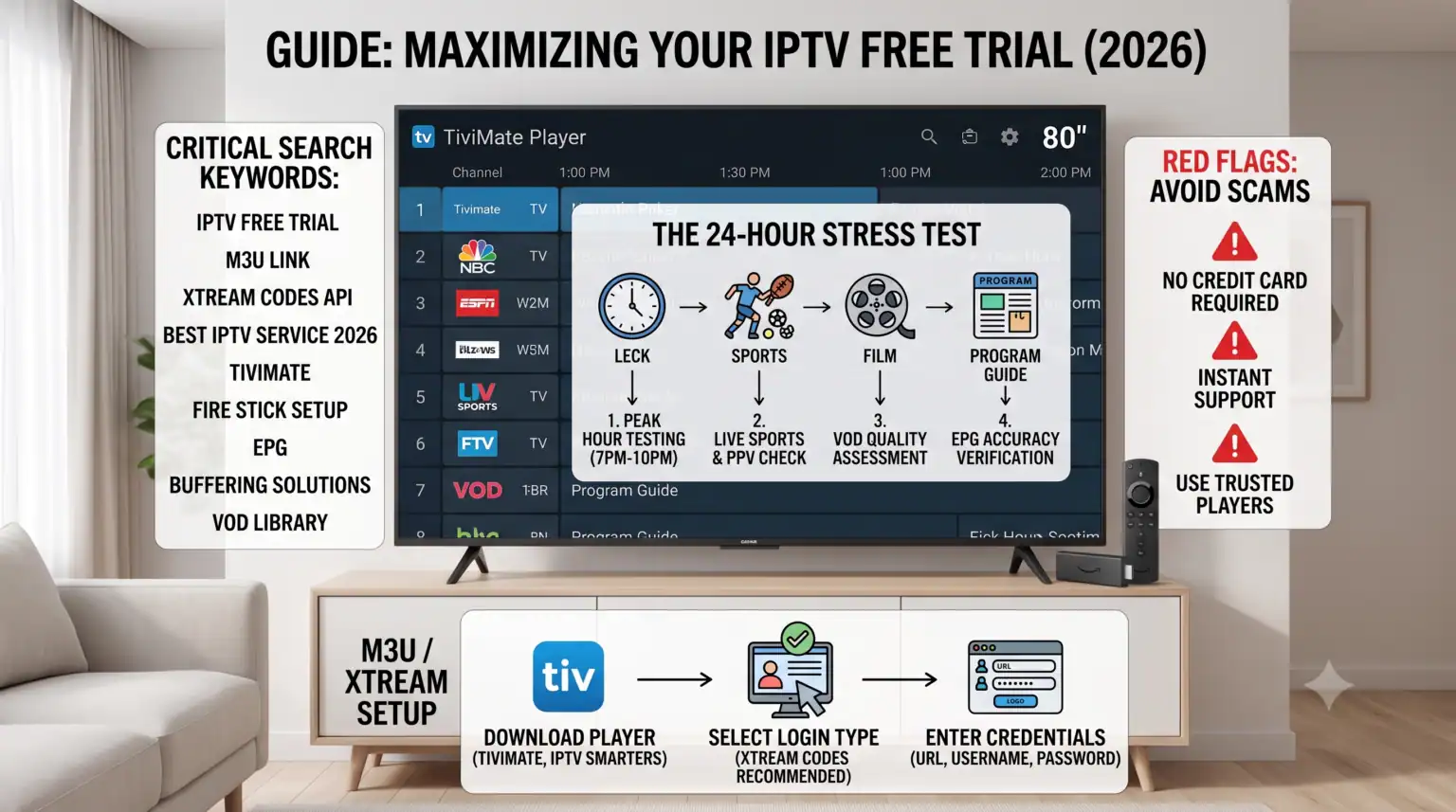
What to Actually Test During Your 24-Hour Window
Don’t just turn on a random news channel, see that it works, and assume the service is good. You need to stress-test the provider. Once you receive your login credentials, run through this checklist.
1. The Peak-Hour Stress Test
Test the service between 7:00 PM and 10:00 PM in your local time zone. This is when server loads are at their highest. If a provider doesn’t have the bandwidth to handle the evening rush, you will experience freezing, buffering, and audio loops.
2. Live Sports and PPV Events
Sports streams are notoriously difficult to host reliably because millions of people tune in simultaneously. Find a live match preferably a high-demand Premier League game, NFL broadcast, or UFC fight and watch it for at least 15 minutes. Note any audio desync or sudden drops in frame rate.
3. VOD (Video on Demand) Library
Check the movie and TV show section. You are looking for working subtitles, fast load times, and properly categorized content. If the VOD section is a disorganized mess of dead links or missing audio tracks, move on.
4. EPG (Electronic Program Guide) Accuracy
A working TV guide makes an IPTV service feel like premium cable. If the EPG is blank or wildly out of sync with what is actually broadcasting, it will make navigating those 10,000+ channels a nightmare.
Legitimate Services vs. Third-Party Providers
Lorem ipsum dolor sit amet, consectetur adipiscing elit. Ut elit tellus, luctus nec ullamcorpe
When searching for a trial, you will encounter two main tiers of service. Knowing the difference sets your expectations for what a trial should look like.
| Funktion | Verified Legal Services (Hulu, Sling, Fubo) | Third-Party IPTV Services |
| Trial Length | 3 to 7 days | 24 til 48 timer |
| Priser | High ($40 – $90+/month) | Low ($10 – $20/month) |
| Antal kanaler | 50 to 150+ | 10,000+ |
| Card Required? | Ja | Usually No |
Verified services offer guaranteed legality and pristine apps, but you pay a premium. Third-party providers offer massive global libraries for a fraction of the cost, but server quality varies wildly from provider to provider making the trial absolutely essential.
How to Set Up Your Free Test
Most third-party providers will email you an M3U link or Xtream Koder (a Username, Password, and Server URL). Here is how to get it running smoothly.
1.Download a Player :Avoid proprietary apps.
Install a reliable, standalone player like TiviMate, IPTV Smarters, or XCIPTV on your Firestick, Android TV, or Smart TV.
2.Select Login Method :
Open the app and choose “Login with Xtream Codes API.” This is generally faster and more stable than pasting a massive M3U link.
3.Enter Credentials :
Carefully type in the URL, username, and password provided in your trial email. Pay attention to case sensitivity.
4.Wait for Download :
Let the app download the channels, VOD library, and EPG data. This can take a few minutes depending on the size of the provider’s library.
Red Flags: When to Walk Away
Ikke alle IPTV-udbydere are worth your time. If you spot any of these warning signs while applying for a free trial, close the tab and look elsewhere:
Credit Card Demands: A true third-party IPTV trial should only require an email address or a WhatsApp message. Never hand over credit card details just to test an M3U link.
“Paid” Trials: Some providers charge $2 or $3 for a 24-hour test. While they claim this stops spam, the best providers let their quality speak for itself entirely for free.
Terrible Customer Support: If you request a trial and it takes them three days to email you the login details, imagine how long they will take to fix a broken channel once you actually pay them.
Forced Custom Apps: Be wary of providers that force you to sideload their own proprietary, hard-coded app. You should always have the freedom to use trusted third-party players.
Take advantage of free trials, compare at least two different providers over a weekend, and only hand over your money when you are completely satisfied with the stability.
This video provides additional tips on avoiding buffering and setting up your IPTV list properly, which perfectly complements the testing strategies we discussed.
Top Tips for Getting Started with IPTV in 2026
 Danish
  English (United States)
  German
  Dutch
Dutch  English (UK)
  Norwegian
  Swedish