
Om du har letat efter en IPTV-leverantör, har du säkert sett samma iögonfallande marknadsföringsbanners överallt: “Tusentals kanaler i äkta 4K!” eller “Felfri FHD-streaming!”
Men när man väl startar appen ser den där “True 4K”-sportströmmen ofta misstänkt mycket ut som en uppskalad DVD, eller ännu värre – den hackar så mycket att man missar hela matchen. Verkligheten är att IPTV-streaming är att den här resolutionen bara är halva sanningen.
Om du vill veta vad du egentligen betalar för och hur du får det att fungera smidigt måste du se förbi marknadsföringsjargongen. Här får du en ofiltrerad jämförelse mellan äkta 4K och FHD, samt vad som faktiskt krävs för att streama dem utan det fruktade buffringshjulet.
Antal pixlar: Äkta 4K jämfört med FHD
På en grundläggande hårdvarunivå handlar skillnaden mellan dessa två format i huvudsak om den rena pixeltätheten.
Problemet med "falsk 4K" inom IPTV
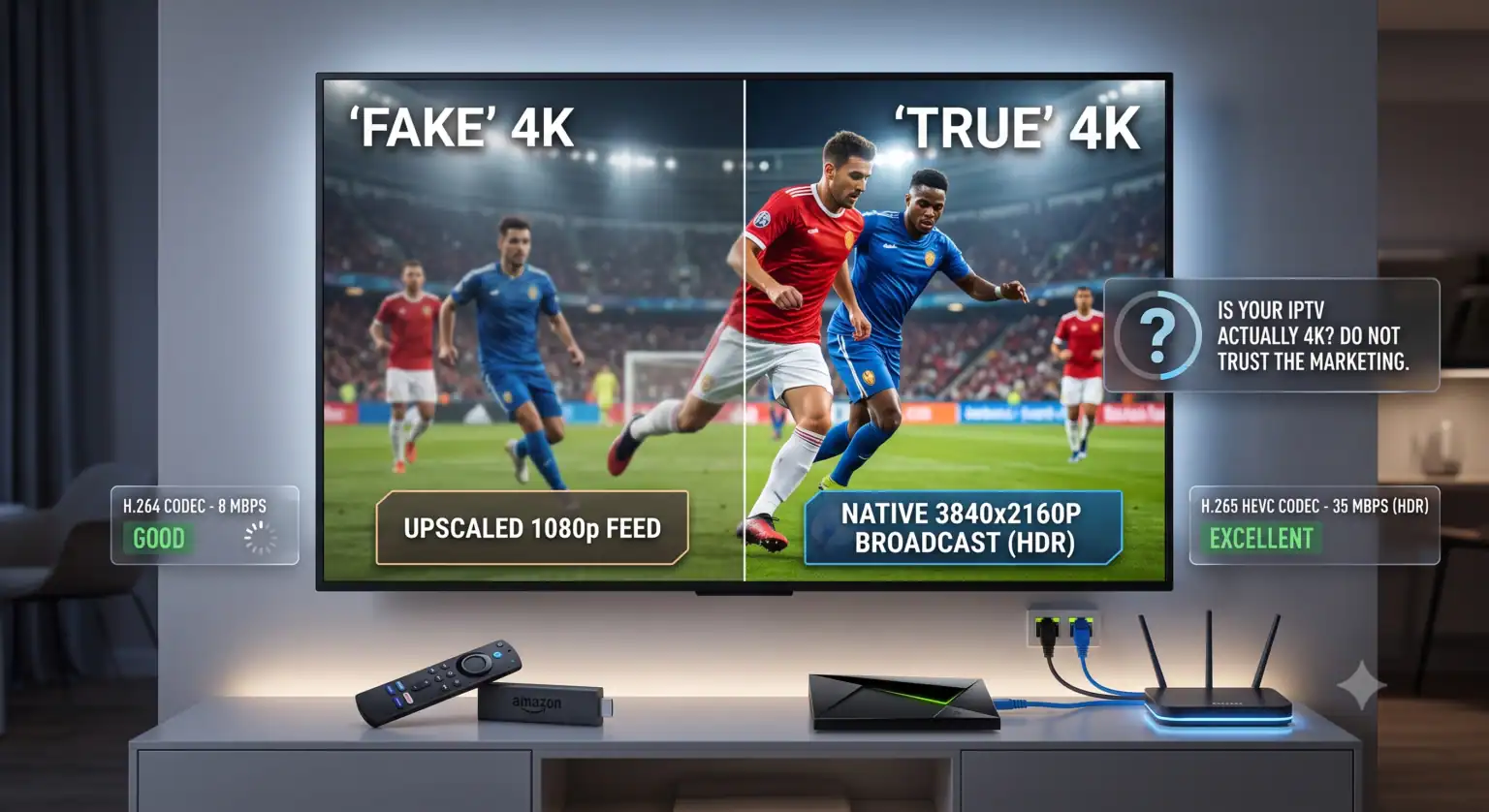
Här är branschens smutsiga lilla hemlighet: en stor del av det som kallas “4K” i IPTV-menyerna är inte material i äkta 4K-upplösning.
Många leverantörer tar en vanlig FHD-sändning (1080p) och uppskalar den helt enkelt på sina servrar, samtidigt som de byter beteckningen till 4K. Även om din TV identifierar signalen som 4K har inga faktiska detaljer lagts till i bilden. A Äkta 4K Med ”kanal” avses att källkameran, sändaren och IPTV-servern alla hanterar bildmaterialet i ursprunglig upplösning 3840×2160. För närvarande är det endast ett fåtal utvalda livekanaler (främst premiumsportkanaler och vissa filmkanaler) som faktiskt sänder i ursprunglig 4K-upplösning.
Den verkliga flaskhalsen: bithastighet och kodekar
Upplösningen anger hur stor bilden är. Bitrate visar hur mycket data bilden faktiskt innehåller.
Man kan ha en 4K-video med en usel bithastighet, och den kommer att se ut som en pixlig, blockig röra. Omvänt kommer en FHD-ström med hög bithastighet att se otroligt skarp och smidig ut. I IPTV-världen är bithastigheten allt.
| Upplösning | Typisk lägsta bithastighet | Rekommenderad internethastighet |
| FHD (1080p) | 5–8 Mbps | 15+ Mbps |
| Äkta 4K (SDR) | 15–20 Mbps | 30+ Mbps |
| Äkta 4K (HDR/60 fps) | 25–35 Mbps | 50+ Mbps |
För att hålla datamängderna på en hanterbar nivå utan att försämra bildkvaliteten använder leverantörerna komprimeringskodekar.
Om du streamar i 4K kommer din leverantör måste använda H.265 (HEVC) kodek. H.265 ger samma bildkvalitet som den äldre H.264-standarden, men kräver cirka 40% till 50% mindre bandbredd. Om en leverantör försöker sända ”True 4K” med den äldre H.264-kodeken kommer ditt nätverk att gå i stå och du kommer att få oändliga buffringsproblem.
Använd den här kalkylatorn för att se exakt hur mycket bandbredd du faktiskt behöver, utifrån den strömningskvalitet du vill uppnå.
Varför din hårdvara sviker dig
Om du har en fiberanslutning på 500 Mbps och dina 4K-strömmar fortfarande buffrar, beror problemet inte på ditt internet utan på din hårdvara.
Att streama äkta 4K-innehåll kodat i H.265 kräver betydande processorkraft. Om du använder en billig, generisk Android-box från för fem år sedan eller den inbyggda appen i en smart-TV i lägre prisklassen, klarar processorn helt enkelt inte av att avkoda H.265-video tillräckligt snabbt.
När processorn når sin maximala kapacitet hoppar den över bildrutor eller fryser videon för att hinna ikapp. Detta kallas för CPU-termisk strypning. Att faktiskt titta på True 4K IPTV, behöver du en enhet som stöder Hårdvaruavkodning för H.265.
Hårdvarulista för äkta 4K
En pålitlig enhet: NVIDIA Shield TV, Apple TV 4K eller Amazon Fire TV Stick 4K max. Dessa enheter har särskilda chip som enbart är avsedda för avkodning av krävande HEVC-strömmar.
Rätt appinställningar: Om du använder appar som TiviMate eller IPTV Smarters bör du ta en titt på uppspelningsinställningarna. Se till att “Hårdvaruavkodning” (ofta betecknat som HW+) är aktiverat ON. Om systemet övergår till avkodning via programvara (SW) kommer 4K-bilden att hacka.
Anslut med kablar: Skippa Wi-Fi. 4K-strömning kräver en konstant, oavbruten dataström. Även den minsta svaghet i Wi-Fi-signalen kan leda till att strömningen pausas och buffras. Använd en Ethernet-kabel direkt från routern till din strömningsenhet.
Slutsatsen: Vilket ska du välja?
Om din TV är mindre än 55 tum, eller om du sitter mer än 10 fot bort, bör du välja en hög bithastighet FHD (1080p) kanaler som sänds med 50/60 fps. Rörelserna blir otroligt smidiga vid sport, det kräver bara en bråkdel av bandbredden och din hårdvara behöver inte anstränga sig det minsta.
Spara Äkta 4K sändningar för stora skärmar, filmkanaler i biokvalitet och stora PPV-evenemang, förutsatt att du har en fast internetanslutning och att din hårdvara klarar av det.
 Swedish
  English (United States)
  German
  Dutch
Dutch  Danish
  English (UK)
  Norwegian