
If you are pushing live video across a network, your stream is only as good as the hardware compressing it. Whether you are outfitting a sports bar with dozens of displays, setting up a corporate broadcast network, or building a local streaming empire, the heavy lifting happens in one specific piece of gear: the IPTV-kodare.
Let’s cut through the marketing noise. You don’t just need a box that takes a video cable on one side and an Ethernet cable on the other. You need a rock-solid appliance that handles heat, manages bandwidth efficiently, and keeps audio and video in perfect sync for hours or days on end.
Here is exactly what an IPTV encoder does, why the underlying tech matters, and how to choose the best one for your specific streaming setup.
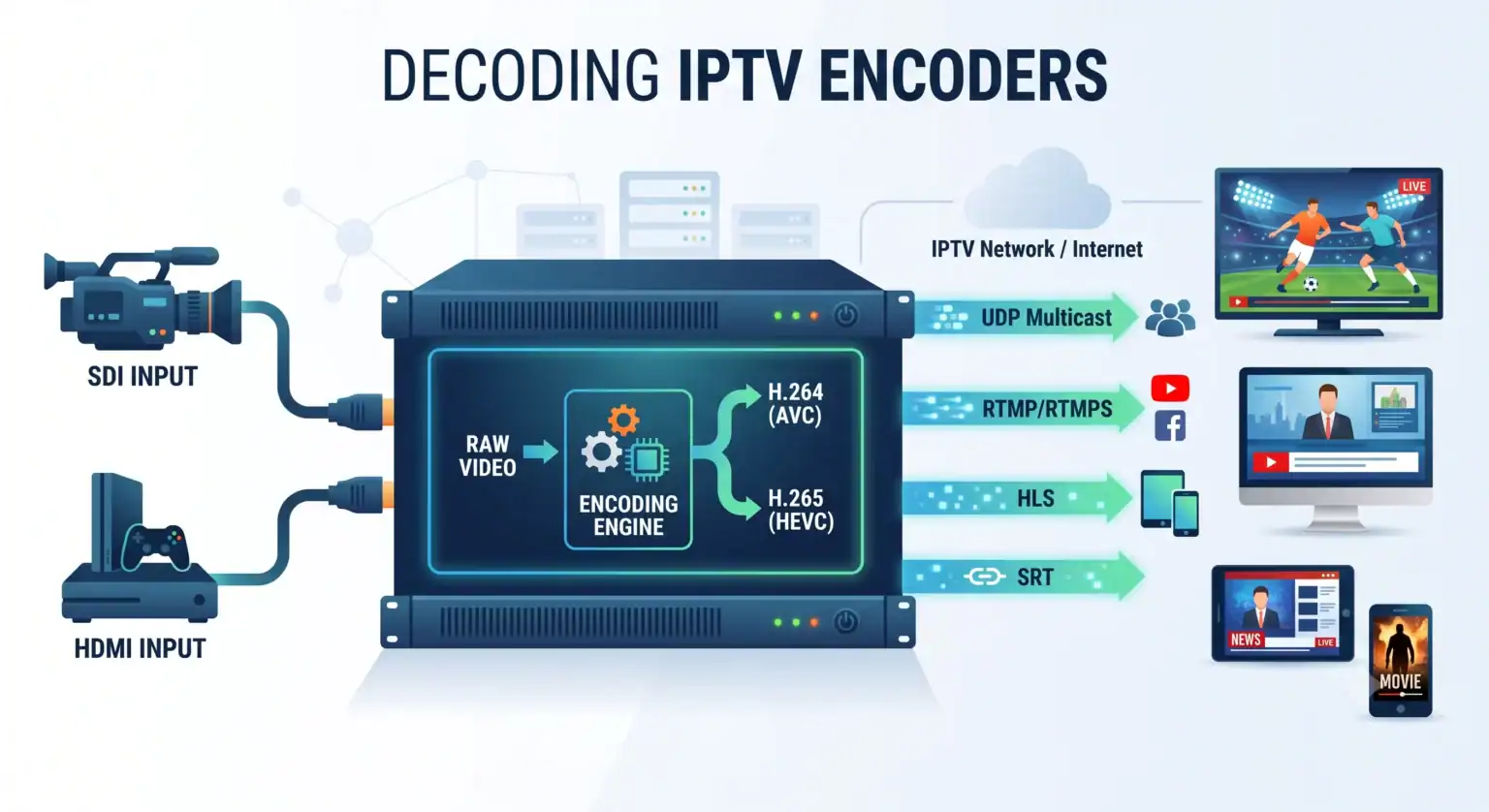
What is an IPTV Encoder, Really?
At its core, an IPTV video encoder is the bridge between the traditional baseband video universe (HDMI, SDI, CVBS) and the modern IP-based streaming universe.
Cameras, set-top boxes, and media players output massive amounts of uncompressed data. If you tried to push raw 4K or even 1080p video over a standard local area network (LAN), you would instantly choke your bandwidth. An IPTV encoder accepts that raw video and audio, compresses it using a highly efficient algorithm (a codec), wraps it into network-friendly packets, and fires it out over Ethernet or Wi-Fi.
The process happens in milliseconds. A high-performance IPTV hardware encoder will take a raw SDI feed from a live sports camera, compress it, and package it into an HLS or UDP stream with virtually unnoticeable latency.
Hardware Encoders vs. Software Encoders
When building an IPTV infrastructure, you will immediately face a choice: do you buy a dedicated hardware encoder or run encoding software (like OBS or vMix) on a PC?
Software encoders are flexible and cheap. If you are a solo streamer sitting at a desk, they are perfect. But if you are running a 24/7 operation, software introduces variables you simply don’t want. Operating system updates, background processes, and CPU thermal throttling can all lead to dropped frames or crashed streams.
Hardware IPTV encoders are purpose-built appliances. They utilize dedicated Application-Specific Integrated Circuits (ASICs) or FPGAs designed to do exactly one thing: process video.
Zero OS overhead: They don’t run Windows; they usually run a stripped-down, embedded Linux kernel.
Thermal stability: They are built with massive heatsinks and efficient airflow to run inside hot server racks without breaking a sweat.
Set-it-and-forget-it reliability: Once configured, a professional HD IPTV encoder can run for months without needing a reboot.
The Codec Battle: H.264 vs. H.265 (HEVC)
If you are shopping for an IPTV encoder today, the codec support is your most critical specification.
H.264 (Advanced Video Coding) is the workhorse of the internet. It is incredibly compatible. Every smart TV, smartphone, and set-top box manufactured in the last fifteen years can decode H.264. If maximum compatibility across older legacy hardware is your goal, H.264 is your best bet.
H.265 (High-Efficiency Video Coding or HEVC) is the modern standard. It offers up to a 50% reduction in bitrate compared to H.264 while maintaining the exact same visual quality. This is a massive deal if you are paying for outbound bandwidth or trying to squeeze multiple 4K channels onto a crowded local network. The tradeoff? HEVC requires significantly more processing power to encode and decode. You must ensure that both your encoder och your end-user viewing devices (IPTV decoders or smart TVs) explicitly support H.265.
Key Specs to Look For When Buying an IPTV Encoder
Not all streaming gear is created equal. Before you pull the trigger on a new setup, run down this checklist:
1. Input Interfaces (HDMI vs. SDI)
If you are connecting consumer gear like a Blu-ray player or a standard cable box an HDMI IPTV encoder is fine. However, HDMI cables are notorious for failing over long runs and lacking physical locking mechanisms. If you are dealing with professional broadcast cameras or live event production, look for an encoder with SDI inputs (3G-SDI, 6G-SDI, or 12G-SDI). SDI uses locking BNC connectors and can run for hundreds of feet without signal degradation.
2. Network Protocols Support
Where is your video going?
UDP / RTP: Essential for multicasting over a private LAN (like sending one channel to 500 hotel room TVs simultaneously).
RTMP: The legacy standard for pushing live video to external platforms like YouTube, Twitch, or Facebook Live.
SRT (Secure Reliable Transport): The gold standard for sending low-latency video over unpredictable public internet connections.
HLS: Best for delivering content to mobile devices and web browsers.
Ensure the encoder supports the specific protocol your destination requires.
3. Glass-to-Glass Latency
Latency is the time it takes for an event to happen in real life and show up on the screen. For a church sermon, a 10-second delay might not matter. But for live sports betting, interactive auctions, or two-way interviews, every millisecond counts. High-end encoders will advertise sub-second latency (often in the 200–500ms range) when paired with the right streaming protocol.
4. Multi-Channel Output
Sometimes you need to send a high-quality 4K stream to a local server, and a lower-quality 720p stream to a mobile app. Den bästa IPTV encoders feature dual-stream or multi-stream capabilities, allowing you to output the same video feed at different bitrates and resolutions simultaneously.
Getting Your Setup Right
Deploying an IPTV encoder isn’t just about plugging it in. It requires matching your hardware to your network environment. Ensure your network switches are configured properly (especially enabling IGMP snooping if you are utilizing multicast traffic) to prevent your video streams from flooding your network and crashing other devices.
Take the time to assess your input sources, calculate your bandwidth limits, and invest in an encoder that gives you headroom to grow. When the video goes live and the stream is flawless, you’ll be glad you didn’t cut corners on the hardware.
 Swedish
  English (United States)
  German
  Dutch
Dutch  Danish
  English (UK)
  Norwegian