
Als je een Apple TV 4K, dan weet je al dat dit een van de krachtigste streamingboxen op de markt is. Hij verwerkt hoge bitsnelheden moeiteloos, schaalt beelden prachtig op en de interface werkt ongelooflijk soepel. Maar als het gaat om het vinden van een betrouwbare Apple TV IPTV-aanbieder en het native laten werken op tvOS, kan het allemaal een beetje verwarrend worden.
Apple houdt de teugels strak in de hand wat betreft de App Store. In tegenstelling tot Android- of Firestick-apparaten, waarop je gemakkelijk niet-geverifieerde APK’s kunt installeren, moet je je bij de Apple TV aan de regels houden.
Hier is het goede nieuws: je hoeft niets via sideloading te installeren. De tvOS App Store biedt momenteel een aantal van de beste IPTV-spelers beschikbaar op elk platform. Je moet alleen weten hoe je de juiste app aan een betrouwbare aanbieder koppelt.
De gouden regel: aanbieders versus spelers
Voordat je iets doet, moet je het verschil tussen een speler en een aanbieder begrijpen.
De IPTV-speler (De app): Dit is de lege app die je rechtstreeks uit de Apple TV App Store downloadt. Op zichzelf bevat deze app geen enkel kanaal, geen films en geen sportuitzendingen.
De IPTV-aanbieder (De dienst): Dit is het abonnement dat je via een website van een derde partij aanschaft. Zij verstrekken je de inloggegevens (meestal een M3U-link of de Xtream Codes API) die je in je speler-app invoert om de inhoud te laden.
Om alles soepel te laten verlopen, heb je beide nodig.
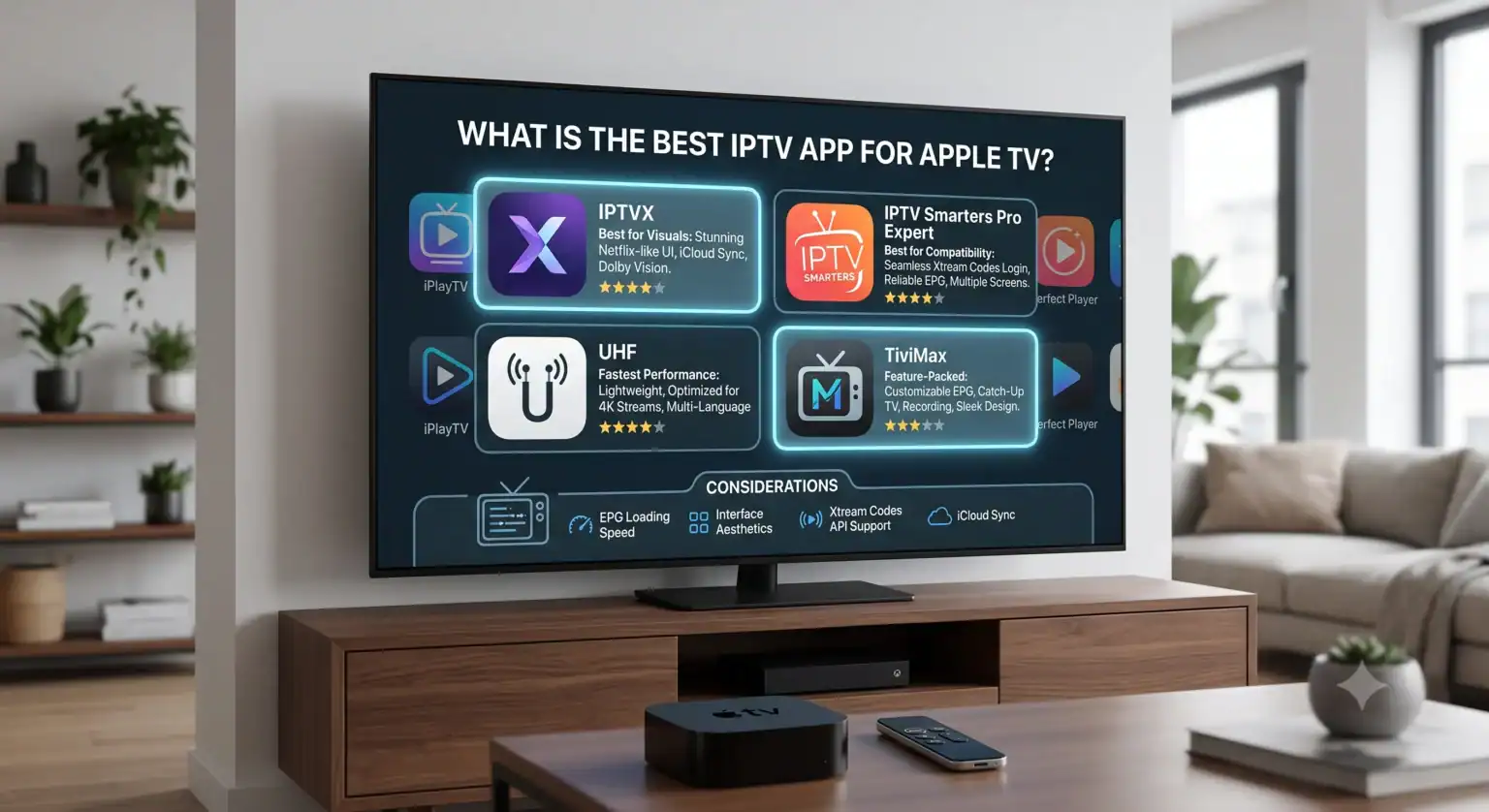
De beste IPTV-apps voor Apple TV in 2026
Aangezien je op een Apple TV geen speciale app rechtstreeks van je IPTV-aanbieder kunt downloaden, moet je een speler van een derde partij gebruiken. Dit zijn momenteel de beste apps op tvOS:
1. IPTVX
Als je wilt dat je live-tv en VOD (Video on Demand) er precies zo uitzien als bij Netflix of Apple TV+, dan is IPTVX de onbetwiste koning. Het haalt metadata, filmposters en informatie over de cast op om een prachtige gebruikersinterface te creëren. Het ondersteunt ook Dolby Vision, HDR10 en iCloud-synchronisatie, wat betekent dat als je het op je Apple TV instelt, je afspeellijsten automatisch worden gesynchroniseerd met je iPhone en iPad.
2. Smarters Pro (of IPTV Smarters Player-expert)
Dit is niet voor niets de industriestandaard. Het is niet zo opzichtig als IPTVX, maar het is wel uiterst betrouwbaar. Smarters Pro maakt inloggen ongelooflijk eenvoudig, omdat het intensief gebruikmaakt van het Xtream Codes API-formaat (gebruikersnaam, wachtwoord en server-URL) in plaats van je te dwingen om enorme M3U-links in te voeren met de Siri-afstandsbediening. Het biedt ook uitstekende ondersteuning voor Catch-up TV en kijken op meerdere schermen.
3. De perfecte IPTV-speler
Een fantastisch alternatief als je op zoek bent naar een snelle en lichtgewicht app. Gebruikers melden keer op keer dat Perfect IPTV Player grote afspeellijsten (meer dan 50.000 kanalen) aankan zonder vertraging of dat het geheugen van de Apple TV vastloopt. De app biedt bovendien uitstekende iCloud-synchronisatie en een zeer overzichtelijke, gebruiksvriendelijke EPG (Electronic Program Guide).
Waar je op moet letten bij het kiezen van een IPTV-aanbieder voor Apple TV
Niet alle aanbieders zijn gelijk, en aangezien de Apple TV 4K in staat is tot hoogwaardige videoweergave, wil je een dienst die daadwerkelijk optimaal gebruikmaakt van je hardware. Houd bij het kiezen van een aanbieder rekening met de volgende factoren:
Ondersteuning voor de Xtream Codes API: Vermijd aanbieders die alleen ik geef je een M3U-link. Xtream Codes (waar je een gebruikersnaam, wachtwoord en portaal-URL krijgt) laadt veel sneller in tvOS-apps en werkt de tv-gids (EPG) veel betrouwbaarder bij.
Echte 4K- en 60 fps-sportopnames: Veel goedkope aanbieders comprimeren hun streams tot 720p of 30 fps. Als je live sportwedstrijden zoals voetbal of basketbal bekijkt, ziet 30 fps er op een groot scherm schokkerig uit. Zoek naar aanbieders die adverteren met onbewerkte, ongecomprimeerde streams van 50/60 fps.
Serverbeschikbaarheid en bevriezingsbeveiliging: De grootste klacht over IPTV is het bufferen tijdens grote live-evenementen. Kies voor premium-aanbieders die hun verkeer via servers met load balancing leiden.
TV kijken: Een goede aanbieder neemt de laatste 48 tot 72 uur aan populaire zenders op, zodat je live-tv rechtstreeks vanuit apps zoals Smarters Pro kunt terugspoelen.
Hoe stel je je abonnement in?
Zodra je een abonnement bij een IPTV-aanbieder hebt afgesloten en een app zoals Smarters Pro uit de Apple TV App Store hebt gedownload, duurt de installatie ongeveer twee minuten.
Open de app en selecteer Inloggen met Xtream Codes API.
Voer een naam in voor je afspeellijst (bijvoorbeeld “Mijn tv”).
Typ de Gebruikersnaam en Wachtwoord zoals vermeld in de e-mail met uw abonnementsgegevens.
Voer de Server URL precies zoals het er staat (vergeet niet http:// of https:// toe te voegen).
Klik op Gebruiker toevoegen en wacht tot de zenders, VOD en series naar je Apple TV zijn gedownload.
Even iets over privacy
Aangezien internetproviders (ISP’s) erom bekend staan dat ze streamingverkeer met een hoge bandbreedte afknijpen, vooral tijdens sportevenementen in prime time, wordt het ten zeerste aanbevolen om een VPN op je Apple TV te gebruiken. Gelukkig ondersteunt tvOS nu standaard VPN-apps, zodat je diensten zoals NordVPN of ExpressVPN eenvoudig rechtstreeks naar je Apple TV kunt downloaden om je verbinding snel en veilig te houden.
Zorg er altijd voor dat de IPTV-aanbieder die je kiest over de juiste licenties en distributierechten voor jouw regio beschikt, zodat je aan de lokale wetgeving inzake streaming voldoet.
 Dutch
Dutch  English (United States)
  German
  Danish
  English (UK)
  Norwegian
  Swedish