
Als je ooit lekker op de bank bent gaan zitten om een livewedstrijd te kijken, maar toen de foutmelding “Account in gebruik” te zien kreeg omdat iemand in de slaapkamer een film had aangezet, dan weet je al hoe frustrerend die beperking op één stream tegelijk kan zijn.
We kijken niet meer alleen op één scherm tv. Tussen smart TV's, tablets en telefoons: huishoudens hebben behoefte aan flexibiliteit. Dat is precies de reden waarom IPTV op meerdere apparaten Abonnementen zijn de nieuwe norm geworden voor mensen die hun kabelabonnement hebben opgezegd.
Maar er bestaat veel onduidelijkheid over hoe deze opstellingen achter de schermen eigenlijk werken. Kun je echt op drie apparaten tegelijk streamen zonder dat er veel buffering optreedt of dat je account wordt geblokkeerd? Laten we eens precies bekijken hoe gelijktijdige verbindingen werken en wat je nodig hebt om ze soepel te laten verlopen.
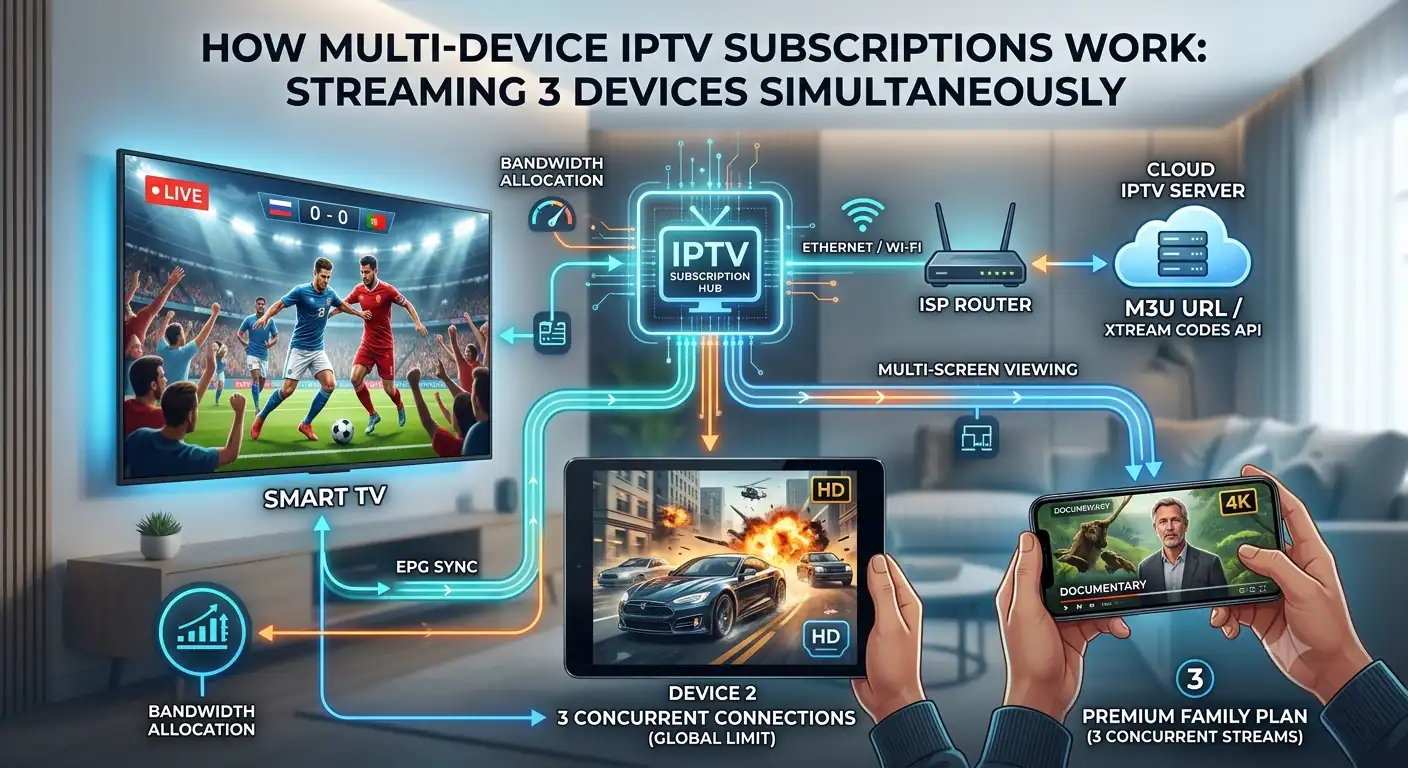
De technologie achter gelijktijdige verbindingen
Als je een IPTV-abonnement afsluit, koop je in feite een digitale sleutel, meestal een M3U-URL of Xtream-codes een verbinding die je mediaspeler met de server van de aanbieder verbindt.
Hoe die server met meerdere schermen omgaat, hangt af van twee verschillende backend-configuraties:
Verbindingen met IP-beperking: Sommige te strenge aanbieders beperken je account tot één enkel IP-adres (dat van je thuisrouter). Je mag misschien wel op meerdere schermen kijken, maar alleen als ze allemaal verbonden zijn met hetzelfde wifi-netwerk thuis. Probeer maar eens op je telefoon te kijken via mobiele data terwijl iemand anders thuis kijkt: het systeem blokkeert je dan.
Algemene limieten voor gelijktijdige gebruikers: Dit is de moderne industriestandaard. Het maakt voor providers niet uit waar je bent of welk IP-adres je hebt; ze tellen alleen het aantal actieve, gelijktijdige streams. Je zou thuis een Firestick kunnen hebben draaien, een laptop in een hotelkamer en een iPad in de trein. Zolang je de limiet voor het aantal actieve verbindingen niet overschrijdt, werkt alles perfect.
Waarom "3 apparaten" de ideale balans is
Dus, kun je op drie apparaten tegelijk streamen? Absoluut. Als je je eens rondkijkt, zul je merken dat drie gelijktijdige streams in feite de norm zijn geworden voor hoogwaardige gezinsopstellingen.
Toonaangevende dienstverleners stemmen hun beste abonnementen doorgaans specifiek af op een abonnement van 12 maanden voor 3 apparaten. Dit biedt de perfecte balans voor een huishouden. Het dekt de tv in de woonkamer, een opstelling in de slaapkamer en laat één plek vrij voor een mobiel apparaat of een tablet voor de kinderen voor onderweg.
Als je probeert een vierde scherm te activeren bij een abonnement voor drie apparaten, grijpt het geautomatiseerde systeem van de provider in. Meestal wordt het nieuwste verbindingsverzoek gewoon geweigerd of wordt de oudste actieve stream abrupt verbroken om ruimte vrij te maken.
De realiteitscheck voor bandbreedte
Het juiste abonnement is slechts een deel van het verhaal. Je lokale internetverbinding moet het werk kunnen dragen.
Live televisie via internet buffert gegevens niet op dezelfde manier als on-demandplatforms dat doen. Hiervoor is een constante, ononderbroken stroom van datapakketten nodig. Als je drie afzonderlijke HD- of 4K-streams Op precies hetzelfde moment moet je router overuren draaien.
Dit is wat je eigenlijk moet voorkomen IPTV buffert bij gebruik van drie schermen:
Standaard HD (1080p): Je hebt minimaal 30 tot 40 Mbps nodig aan toegewijd bandbreedte (ongeveer 10 tot 15 Mbps per scherm).
Echte 4K/UHD-streams: Als je provider sportuitzendingen in 4K met een hoge bitsnelheid aanbiedt, heb je minimaal 75 tot 100 Mbps nodig om drie streams soepel te kunnen afspelen zonder dat je lokale netwerk vastloopt.
Een snelle netwerkoplossing: Als je van plan bent om regelmatig het maximale aantal gelijktijdige verbindingen te benutten, sluit je de tv in je woonkamer dan rechtstreeks via een ethernetkabel aan op de router. Deze eenvoudige maatregel ontlast je wifi aanzienlijk, waardoor de draadloze bandbreedte volledig vrij blijft voor je andere apparaten.
De juiste speler kiezen voor meerdere schermen
Het beheren van een opstelling met meerdere apparaten kan een hele klus zijn als je de afspeellijsten op elk scherm afzonderlijk handmatig moet bijwerken.
Om alles gesynchroniseerd te houden, kun je het beste een applicatie gebruiken die meerdere verbindingen soepel afhandelt. Als je een Android-box of een Firestick, apps zoals TiviMate Premium of IPTV Smarters Pro zijn ontzettend handig. Hiermee kun je je Xtream Codes API één keer koppelen, waarna de elektronische programmagids (EPG) overal soepel wordt bijgewerkt.
Bij sommige premiumdiensten kun je je favorietenlijst zelfs op verschillende apparaten synchroniseren, zodat je niet elke keer dat je van kamer wisselt op zoek hoeft te gaan naar je favoriete sportzenders.
Het goed doen
Je hoeft niet meer te vechten om de afstandsbediening of last te hebben van afspeelfouten. Meerdere apparaten IPTV-abonnementen zijn speciaal ontworpen voor de manier waarop mensen tegenwoordig daadwerkelijk naar content kijken. Als je een opstelling wilt die je eenmaal instelt en daarna niet meer hoeft aan te passen, kies dan voor een degelijk 12-maandenpakket dat standaard 3 apparaten ondersteunt. Sluit je hoofd-tv aan, kies een gebruiksvriendelijke speler-app en je hoeft je nooit meer zorgen te maken over verbindingslimieten.
 Dutch
Dutch  English (United States)
  German
  Danish
  English (UK)
  Norwegian
  Swedish