
Haben Sie schon einmal eine IPTV-Playlist mit Tausenden von Kanälen geladen und dann auf einen leeren Bildschirm gestarrt und sich gefragt, was da eigentlich läuft? Genau hier kommt ein Elektronischer Programmführer (oder EPG) kommt zur Hilfe.
Wenn Sie sich bei Ihrer täglichen Unterhaltung auf IPTV verlassen, macht ein zuverlässiger Programmführer den Unterschied zwischen dem blinden Herumklicken in den Streams und einem erstklassigen, kabelfernsehähnlichen Erlebnis aus. In diesem Leitfaden erklären wir Ihnen genau, was ein EPG ist, wie er funktioniert und wie Sie ihn in Ihren Lieblings-Apps optimal einrichten können.
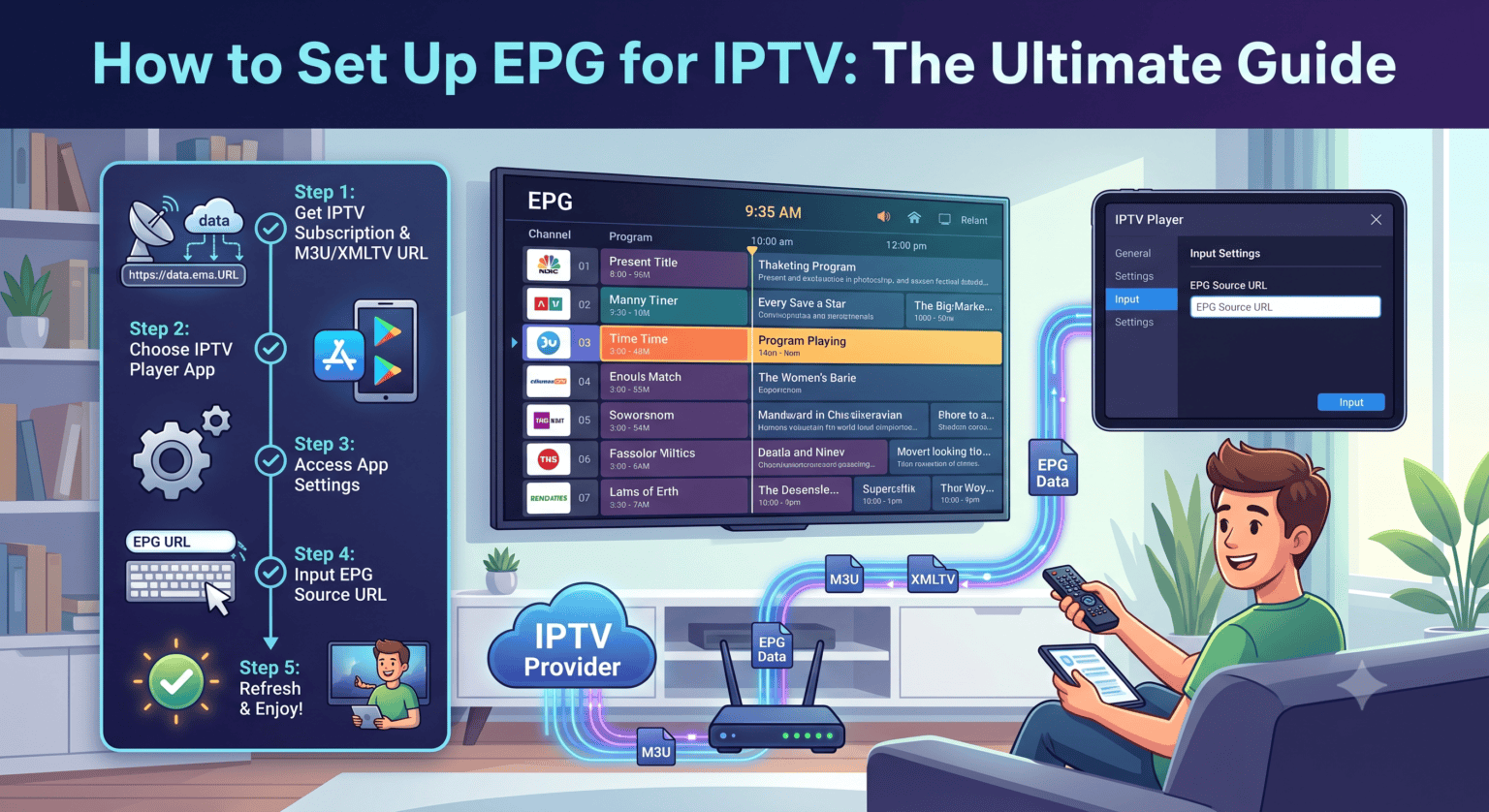
Was ist ein elektronischer Programmführer (EPG)?
Einfach ausgedrückt ist ein elektronischer Programmführer das digitale Fernsehprogramm, das Ihnen anzeigt, was gerade läuft und was später kommt. Wenn Sie mit herkömmlichem Kabel- oder Satellitenfernsehen aufgewachsen sind, kennen Sie das bereits: Es ist dieses klassische Rasterlayout, bei dem links die Sender und oben die Sendezeiten angezeigt werden.
Für IPTV-Nutzer dient der EPG als Navigationsoberfläche. Anstelle einer unübersichtlichen Liste von reinen Stream-Links ordnet ein guter Programmführer alles systematisch und fügt Programmtitel, Beschreibungen, Folgenummern und manchmal sogar Filmplakate hinzu.
So funktioniert der EPG in der Welt des IPTV
Wenn Sie ein IPTV-Abonnement erwerben oder eine kostenlose Wiedergabeliste finden, wird die Rohdatenliste der Kanäle in der Regel über eine M3U-Datei oder ein Xtream-Codes Anmeldung. Die eigentlichen Fahrplandaten stammen jedoch aus einem völlig anderen Dateiformat, das allgemein bekannt ist als XMLTV.
Hier ist der grundlegende Ablauf:
Ihr IPTV-Player liest die Stream-Links (die M3U- oder Xtream-API).
Anschließend ruft es die XMLTV-Datei ab, die alle mit Zeitstempeln versehenen Fernsehprogramme enthält.
Die App ordnet die Kanal-IDs aus der Stream-Liste den Kanal-IDs in der XMLTV-Datei zu.
Wenn die Übereinstimmung perfekt ist, werden Ihre Kanäle mit den korrekten Programmdaten gefüllt. Wenn keine Übereinstimmung vorliegt, erhalten Sie die gefürchtete Kennzeichnung “Keine Informationen”.
Warum Sie unbedingt einen funktionierenden EPG brauchen
Es ist verlockend, einfach eine Wiedergabeliste zu laden und mit dem Anschauen zu beginnen, aber ohne eine Anleitung entgehen Ihnen wichtige Funktionen:
Nachholendes Fernsehen: Bei vielen Anbietern können Sie Sendungen ansehen, die bereits vor einigen Tagen ausgestrahlt wurden. Dank einer aktiven EPG-Zeitleiste können Sie zurückblättern und vergangene Sendungen direkt aus dem Programmraster abspielen.
Aufnahme: Wenn Sie eine App wie TiviMate, ohne EPG-Daten lassen sich Aufzeichnungen in der Regel nicht genau planen.
Erkundung und Planung: Sie können sehen, was in 20 Minuten beginnt, nach bestimmten Filmen suchen oder sich detaillierte Inhaltsangaben ansehen, bevor Sie sich für einen Kanal entscheiden.
So richten Sie den EPG in Ihrer IPTV-App ein
Ob Ihr Guide funktioniert, hängt in der Regel davon ab, wie Sie Ihre Wiedergabeliste laden. Hier sind die beiden gängigsten Methoden.
Methode 1: Die automatische Erkennung (Xtream Codes)
Falls Ihr Anbieter Ihnen eine Xtream-Codes Anmeldung (Portal-URL, Benutzername und Passwort) – das ist ganz einfach.
Öffnen Sie Ihren Player (z. B. IPTV Smarters oder TiviMate).
Wählen Sie eine Anmeldemöglichkeit aus Xtream Codes API.
Geben Sie Ihre Daten ein.
Da die Playlist und die Programmdaten vom exakt selben Server stammen, ruft die App den EPG automatisch ab. Diese Methode bietet Ihnen die höchste Übereinstimmungsrate, und in der Regel müssen Sie keine weiteren Einstellungen vornehmen.
Methode 2: Manuelle Einrichtung (M3U- und XMLTV-Links)
Wenn Sie einen M3U-Link verwenden, benötigen Sie in der Regel eine separate URL für das Programm.
Rufen Sie die Einstellungen Ihres IPTV-Players auf und suchen Sie die Playlists oder EPG Abschnitt.
Suchen Sie nach einer Option, um EPG-Quelle hinzufügen oder EPG-URL.
Fügen Sie den von Ihrem Dienst bereitgestellten XMLTV-Link ein (er endet oft auf .xml oder .gz).
Klicken Sie auf „Speichern“ und zwingen Sie die App anschließend dazu, EPG aktualisieren oder Aktualisieren.
Fehlerbehebung: Behebung von "Keine Informationen"-Fehlern
Nichts ist frustrierender, als alles eingerichtet zu haben und dann festzustellen, dass das Programmverzeichnis völlig leer ist. Wenn Ihr EPG leer oder fehlerhaft ist, probieren Sie folgende Lösungen aus:
Aktualisierung erzwingen: Manchmal kommt es vor, dass die App während des Downloads eine Zeitüberschreitung verzeichnet. Gehen Sie in die Einstellungen und klicken Sie dort manuell auf “EPG aktualisieren” oder “Programmübersicht aktualisieren”.
Überprüfen Sie die URL: Tippfehler kommen vor. Vergewissere dich, dass du am Ende deines XMLTV-Links nicht versehentlich ein zusätzliches Leerzeichen eingefügt hast.
Kanäle manuell zuweisen: In Premium-Apps wie TiviMate kannst du, wenn bei einem Sender “Keine Informationen” angezeigt wird, den Sender lange gedrückt halten und dann auswählen EPG zuweisen, und ordnen Sie es manuell dem richtigen Eintrag aus Ihrer Quelle zu.
Nutzen Sie einen Drittanbieter-Dienst: Falls das Programmverzeichnis Ihres Anbieters mangelhaft ist, können Sie tatsächlich auf externe EPG-Quellen zurückgreifen. Viele Nutzer greifen auf Dienste (sowohl kostenlose als auch kostenpflichtige) zurück, die hochpräzise, maßgeschneiderte XMLTV-Dateien speziell für fehlende Sender erstellen.
Die Einrichtung Ihres elektronischen Programmführers dauert nur wenige Minuten, verändert aber Ihr IPTV-Erlebnis grundlegend. Nehmen Sie sich die Zeit für die richtige Einrichtung, und Sie werden nie wieder durch endlose, namenlose Senderlisten blättern wollen.
 German
  English (United States)
  Dutch
Dutch  Danish
  English (UK)
  Norwegian
  Swedish