
If you are transitioning away from traditional RF (Radio Frequency) cable to an IP-based delivery system, the underlying architecture of your home network dictates your viewing experience. Achieving IPTV without buffering isn’t merely about paying for a “faster” internet tier; it is a complex interplay of network latency, video encoding, hardware processing, and packet delivery.
When users search for the best IPTV provider, they often look at channel counts. However, the true metric of a high-tier IPTV subscription is how their servers handle bitrates and stream compression.
To engineer a truly stable IPTV setup whether utilizing a dedicated IPTV Android box or an IPTV Smart TV interface you must look beyond marketing jargon and understand the technical requirements of live data streaming.
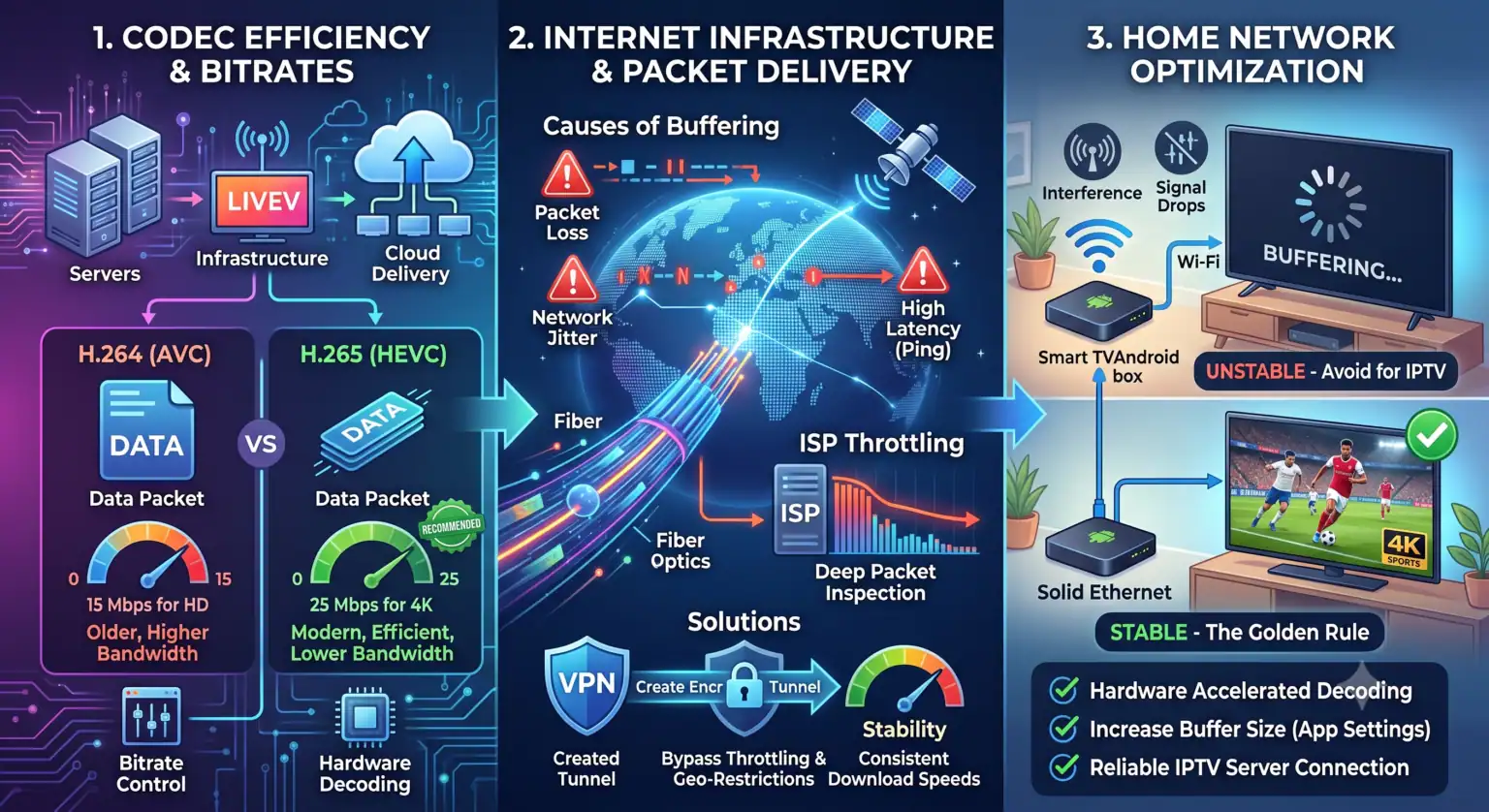
Codec Efficiency: The Engine Behind Video Quality
When discussing bandwidth, focusing solely on resolution (1080p vs. 4K) is fundamentally flawed. Resolution merely describes the geometry of the image (pixel count). The actual data weight of the stream is determined by its bitrate (measured in Megabits per second, or Mbps) and the efficiency of the video codec compressing that data.
Live IPTV broadcasts typically utilize one of two primary video compression standards:
H.264 (Advanced Video Coding – AVC): The legacy standard. It requires higher bitrates to maintain visual fidelity, meaning a 1080p stream encoded in H.264 demands significant network capacity.
H.265 (High Efficiency Video Coding – HEVC): The modern standard. HEVC boasts a 50% greater compression efficiency compared to AVC. An HEVC-encoded stream can deliver the exact same 4K picture quality using half the bandwidth.
Here is the technical breakdown of required network throughput based on target bitrates and codec profiles:
| Resolution | Frame Rate | Codec | Target Bitrate | Minimum ISP Provisioning |
| HD (720p) | 30/60 fps | H.264 / AVC | 3 – 5 Mbps | 10 Mbps |
| FHD (1080p) | 60 fps | H.264 / AVC | 8 – 12 Mbps | 20 Mbps |
| 4K (2160p) | 60 fps | H.265 / HEVC | 15 – 25 Mbps | 50 Mbps |
Note: ISP provisioning must always exceed the target bitrate to account for network overhead and TCP/IP header sizes.
Hardware Decoding and the Best IPTV Players
Your network can successfully deliver a 25 Mbps data payload, but if your client device lacks the SoC (System on Chip) capabilities to decode the stream via hardware acceleration, the video will stutter. Software decoding heavily taxes the CPU, leading to thermal throttling and frame drops.
Choosing the best IPTV players ensures optimal handling of media containers (like MPEG-TS or M3U8) and dynamic buffer allocation.
TiviMate Premium: Recognized as the premier IPTV app for Firestick and Android TV OS, it excels at utilizing ExoPlayer for hardware-accelerated HEVC decoding, making it highly resilient against stream jitter.
IPTV Smarters Pro: A highly versatile cross-platform application. It supports multiple media player engines (built-in, VLC) which allows users to force software decoding if their hardware encounters codec incompatibilities.
IBO Player: Engineered for webOS and Tizen (LG and Samsung). It is highly optimized for lower-memory environments, mitigating the out-of-memory crashes common on native Smart TV processors.
XCIPTV Player: Features aggressive pre-buffering capabilities via its ExoPlayer integration, parsing Xtream Codes APIs with minimal latency.
Datagram Delivery: Packet Loss and Network Jitter
Unlike VOD (Video on Demand) services like Netflix—which utilize TCP (Transmission Control Protocol) to guarantee packet delivery and allow for deep, multi-minute buffering—live television often relies on HLS (HTTP Live Streaming) or MPEG-TS over UDP (User Datagram Protocol).
UDP is a “fire and forget” protocol. It prioritizing real-time delivery over data integrity. If your network experiences packet loss, the missing data is not re-transmitted. Visually, this results in macroblocking (pixelation), audio desynchronization, or total frame freezing.
Similarly, Network Jitter—the variance in packet arrival time—destroys stream stability. A connection with an average 30ms ping but a high jitter variance (bouncing from 10ms to 150ms) will exhaust your media player’s buffer pool, causing playback to halt while the buffer replenishes.
Deep Packet Inspection and the Role of VPNs
If your internal network diagnostics show zero packet loss, optimal bitrates, and hardware decoding is active, yet you still experience buffering during peak evening hours, the point of failure is likely at the ISP (Internet Service Provider) level via traffic shaping.
ISPs utilize DPI (Deep Packet Inspection) to analyze network traffic. When an ISP’s automated systems detect a sustained, high-bitrate UDP or HLS video stream originating from an unverified server, they will often throttle the connection to conserve their backbone bandwidth.
To bypass this, utilizing the best VPN for IPTV is a necessary network countermeasure.
Encapsulation: A VPN encrypts the data payload (typically utilizing AES-256-GCM cipher) and encapsulates the IPTV traffic within an encrypted tunnel (via protocols like WireGuard or OpenVPN).
DPI Evasion: Because the ISP can no longer read the packet headers to identify the traffic as a high-bandwidth video stream, their automated traffic shaping algorithms remain untriggered, allowing you to sustain the continuous bitrate required for live 4K streaming.
The Physical Layer: Half-Duplex Wi-Fi vs. Full-Duplex Ethernet
The most critical bottleneck in any IPTV infrastructure is the physical layer connecting your streaming device to your router. Never rely on an 802.11 (Wi-Fi) protocol for live stream delivery.
Wi-Fi is a half-duplex medium operating on a CSMA/CA (Carrier Sense Multiple Access with Collision Avoidance) protocol. Simply put, a Wi-Fi radio can only send or receive data at one time, not both. It is highly susceptible to RF interference, channel congestion, and multipath fading, all of which induce packet loss and latency spikes.
Conversely, a wired Ethernet connection (Cat5e or Cat6) provides a full-duplex, collision-free pathway. Hardwiring your hardware guarantees the lowest possible latency, virtually eliminates packet jitter, and ensures your device receives the uncompromised continuous bitrate necessary to render a flawless broadcast.
 English (United States)
  German
  Dutch
Dutch  Danish
  English (UK)
  Norwegian
  Swedish