
Let’s be completely honest traditional cable is essentially a thing of the past. Between sky-high monthly bills and rigid contracts, millions of viewers are jumping ship. But if you’re new to the world of internet television, diving in can feel a bit like the Wild West. You run a quick search for an IPTV subscription, and suddenly you’re drowning in tech jargon, aggressive sales pitches, and an endless sea of hardware options.
Whether you’re looking to watch weekend sports without blackout restrictions or just want all your favorite VOD (Video on Demand) movies in one place, finding the right setup matters. Here is exactly what you need to know to find the best IPTV service, choose the right hardware, and banish buffering for good.
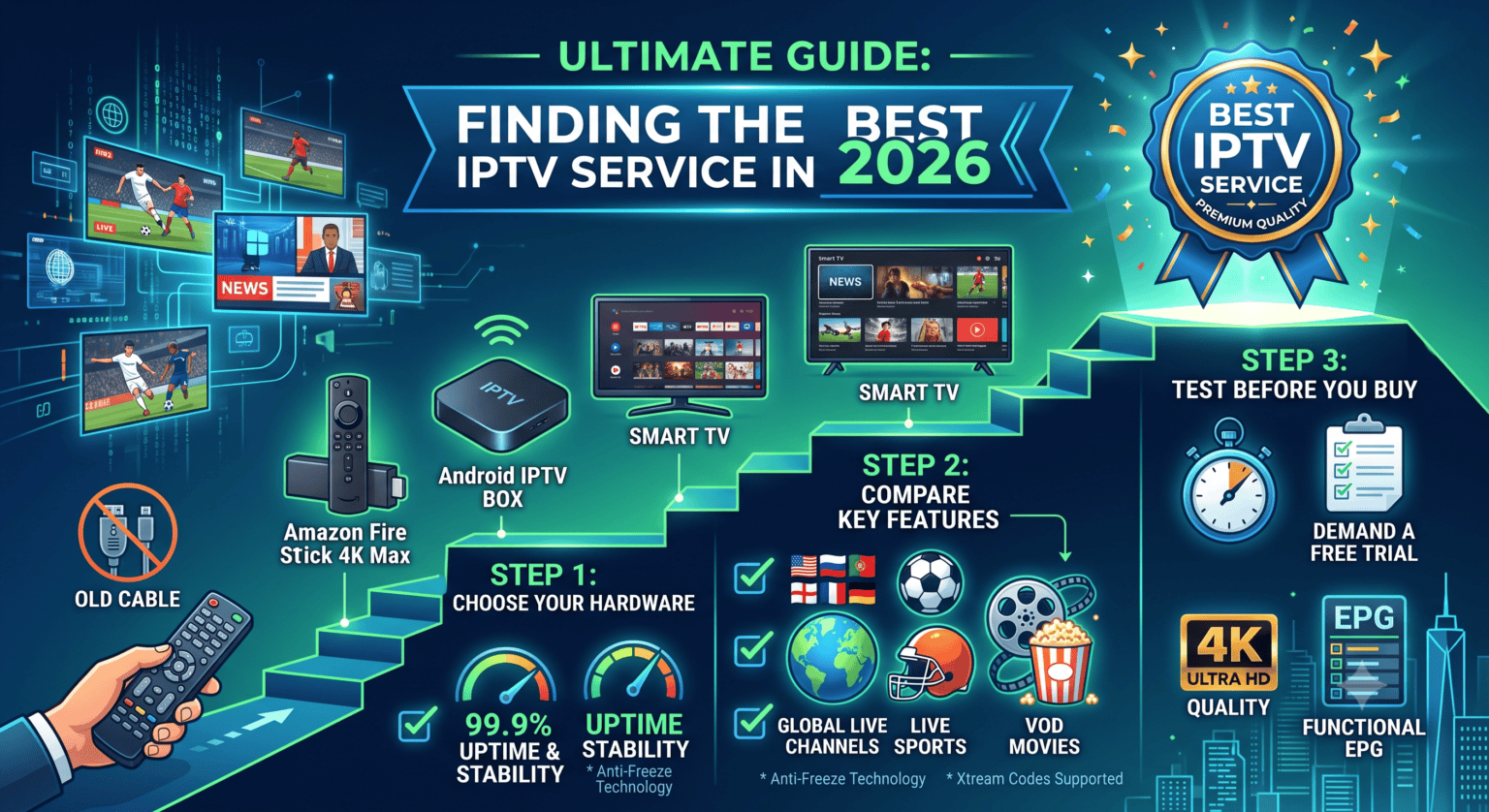
1. The Hardware: What Do You Actually Need?
You don’t need to spend a fortune to get a great streaming experience, but your hardware will dictate how smooth your interface feels.
The Amazon Fire Stick: Search data shows the IPTV Fire Stick combination is incredibly popular right now. It makes sense Fire Sticks are cheap, portable, and easy to modify. If you go this route, aim for the 4K Max version, as the extra RAM helps handle massive live channel lists without crashing.
Dedicated IPTV Boxes: If you want a premium, lag-free experience, a dedicated IPTV box 4K (like a Formuler or a MAG box) is the way to go. These devices are built from the ground up for live TV. While you might see ads for an “IPTV box fully loaded,” be cautious. It’s almost always better to buy a clean, high-quality Android IPTV box and install your own chosen service rather than buying a pre-packaged, unregulated device.
International Users: If you’re streaming from Europe or looking for French content (often searched as an abonnement IPTV or a boitier IPTV), make sure the hardware you choose supports easy VPN integration.
2. Choosing the Right IPTV App
Your hardware is only the engine; your app is the steering wheel. Even the best service provider will feel clunky if you’re using a bad player.
IPTV Smarters Pro is currently the undisputed king of player apps, driving massive search volume globally. It’s free, supports multiple playlists, and has a very cable-like interface. Other great options include TiviMate (widely considered the holy grail for Android TV users due to its customizable TV guide) and StreamVault.
Pro tip: Most top-tier IPTV providers will just give you a login (an Xtream Codes API or M3U link). You simply plug those details into an IPTV app like Smarters Pro, and your channel list populates automatically.
3. How to Spot a Top-Tier IPTV Subscription
Not all providers are created equal. When you are shopping around and testing services (always demand a 24-hour trial before buying a year upfront), look for these three pillars:
Channel Quality Over Quantity
Don’t get tricked by services boasting “100,000 channels.” Most of those are duplicates, dead links, or international channels you’ll never watch. A reliable provider with 15,000 to 20,000 high-quality, stable channels—especially one that offers dedicated sports servers with 50-60 fps (frames per second)—is vastly superior.
Anti-Freeze Technology
The standard pricing for a good single-device plan is usually between $10 and $20 per month. For that price, you should expect 99% uptime and anti-freeze technology. If your stream is constantly skipping during a big PPV event, you’re with the wrong provider.
A Functional EPG
The EPG (Electronic Program Guide) is your TV schedule. Bad providers have empty, broken TV guides. The best providers maintain their EPGs meticulously, so you actually know what’s playing on channel 402 at 8:00 PM.
4. The Golden Rule of Troubleshooting: Fixing the Dreaded Buffer
Here is a secret that most people don’t know: when your stream buffers, it is rarely the IPTV service’s fault. It is almost always a network or user error. Before you cancel your subscription and complain to customer service, try these quick fixes:
Change Your DNS: Stop using the default DNS provided by your Internet Service Provider (ISP). Go into your device’s network settings and change your DNS to Cloudflare (1.1.1.1) or Google (8.8.8.8). This solves about 70% of loading issues.
Turn Off ISP “Advanced Security”: Many ISPs actively block IPTV routing. Log into your home router’s app and disable features like “Web Shield” or “Advanced Security.”
Use a VPN: If your internet speeds are fast but your live TV is crawling, your ISP is likely throttling your connection. Firing up a reliable VPN encrypts your traffic so your ISP can’t see that you are streaming, instantly clearing up the bottleneck.
The Bottom Line
Making the switch to IPTV doesn’t have to be a headache. Get your hands on a solid streaming device, download an interface you like (such as IPTV Smarters), and take a few different providers for a test drive during peak evening hours. Once you find the right fit, you’ll wonder why you ever paid a traditional cable bill in the first place.
 English (United States)
  German
  Dutch
Dutch  Danish
  English (UK)
  Norwegian
  Swedish